
Open Seller Hub, go to Account, and look for Business Policies. That is where eBay keeps the three settings this guide is about: a postage policy, a returns policy and a payment policy - what eBay itself describes as "the payment, postage, and return details you specify for buyers," built once as a template and attached to as many listings as you like, instead of typed out by hand on every one. If you dropship, get these three things right and there is very little left to doubt about how a listing should be set up. Get them wrong, and it rarely looks like one big mistake - it looks like a slow drip of late dispatches and return disputes that never quite trace back to the setting that caused them.
This guide walks through setting them up properly, once per supplier, and then taking a product all the way from a supplier's page to a live, professional listing with Sellhelm. I sell on eBay UK, so the screens and pounds below are mine, but eBay US runs the same three policies (it calls the first one a shipping policy) under wording that reads almost identically on eBay UK and eBay US, so the same steps apply wherever you sell.
The short version
- Business Policies live in Seller Hub, under Account. Three types: postage, returns, payment.
- Research what each supplier actually states before you set anything. A policy is a promise, and it should match what the supplier has published, not a guess.
- Build one policy per supplier, not one for the whole shop - suppliers rarely share a dispatch schedule.
- Late dispatch and returns problems are measured, and feed into the seller standards level that decides your fees and how visible your listings are.
- Sellhelm attaches a policy per supplier, with a per-product override for the one item that is different, and every listing's dispatch, delivery and returns wording is worked out from whichever policy is attached.
- Nothing reaches eBay unchecked: every draft is compared with the supplier's own page and ticked before it can go live.
Step 1: Find eBay's own Business Policies and see the three types
In Seller Hub, under Account, open Business Policies (if you have not used them before, eBay will ask you to opt in first - it takes a moment and does not touch any listing you already have). You will see three template types, created from the same Create policy dropdown:
- Postage (shipping) policy - how the item is sent, what it costs the buyer, and the dispatch and delivery time the listing states.
- Returns policy - whether returns are accepted, the window (30 days is common), and who pays the return postage.
- Payment policy - largely fixed by eBay's own managed payments now, but still a named template every listing carries.
Every live listing has exactly one of each attached. Change the policy later, and every listing using it updates its stated terms at once - which is exactly why it is worth getting right from the start: one wrong setting is not one wrong listing, it is every listing built on it. (Whether your sourcing model is even allowed on eBay is a different, separate question - a policy problem can quietly hurt an account that is otherwise doing everything right.)
Step 2: Research what each supplier actually states
Every supplier states its own dispatch and delivery times somewhere - a delivery information page, the product page itself, or the terms you agree to when you open a trade account with them. Before building a policy, find that information for each supplier and read it properly: what "in stock" really means for their dispatch time, what happens over a weekend or a bank holiday, and whether delivery time is stated separately from dispatch time (it almost always is). Do this for every supplier you use individually - one supplier's stated times are not a safe stand-in for another's.
A postage policy is a promise, not a hope. Your job is not to invent a number - it is to find the number your supplier has already published, check it looks realistic, and make sure your eBay policy actually matches it. A policy that promises faster than what the supplier states is a promise you already know you cannot always keep.
This single step is where most of the "is dropshipping worth it" disappointment actually starts to go wrong, and it costs nothing to get right: read what the supplier has already published, once, and build every future order on that instead of a guess. If a supplier's stated times look vague or unrealistically fast, treat that as a warning sign worth checking further, not something to take on trust.
Step 3: Build one honest policy per supplier, on eBay
Back in Business Policies, eBay's own steps for building one are short: from the Create policy dropdown, pick a type, give it a descriptive name (something like the supplier's own name, so you can tell policies apart later), add your details, and select Save. Base the postage policy's dispatch time on what the supplier itself states, with a small margin rather than the tightest number you could defend.
If you buy from more than one supplier, and most dropshippers eventually do, build a separate postage policy for each one rather than stretching a single shop-wide policy to cover all of them. A supplier who dispatches same-day and one who batches orders twice a week cannot honestly share a policy that states one dispatch time for both - and the usual way this goes wrong is not carelessness, it is a second and third supplier added later without ever getting their own policy, so their products just inherit whatever was already set and happen to be wrong for them.
Widen your delivery time at busy periods
Couriers slow down at predictable times of year - Christmas most of all, but also around other peak sales events. eBay's own seller standards policy says it will "remove defects and/or late deliveries when things happen that are outside of your control, such as severe weather or carrier disruptions," but the safer approach is not to rely on that after the fact: widen the delivery estimate on the affected postage policy for the weeks around a known busy period, so a predictable seasonal slowdown never turns into a late mark on your account in the first place. Put the normal time back once the rush is over.
Step 4: Understand what is actually riding on this
eBay is not relying on buyers to complain. Late dispatch, late delivery and item-not-as-described cases are tracked automatically, and they feed into your seller standards level, which decides your fees and how visible your listings are. A handful of late marks rarely does much on their own - it is a postage policy that is quietly wrong for one supplier, applied across every listing sourced from them, that generates late marks steadily, week after week, without ever looking like one big failure you would notice and fix.
Returns work the same way in reverse: a returns policy that is vague, or that puts the cost of a return on the buyer when your own supplier would not have allowed that, creates exactly the kind of dispute that becomes a case - and a case you lose or that gets escalated counts against your account, on top of the refund itself. None of this is a reason to avoid dropshipping. It is a reason to spend twenty honest minutes per supplier getting Steps 2 and 3 right, once.
Step 5: Connect your suppliers in Sellhelm and attach the policies
Sellhelm is where the per-supplier policies you just built stop being something you have to remember. Add each supplier you use as its own shop, refresh your policies from eBay, and attach the right postage, returns and payment policy to that shop. Every product sourced from it then uses those policies automatically - nothing to set again, product by product.
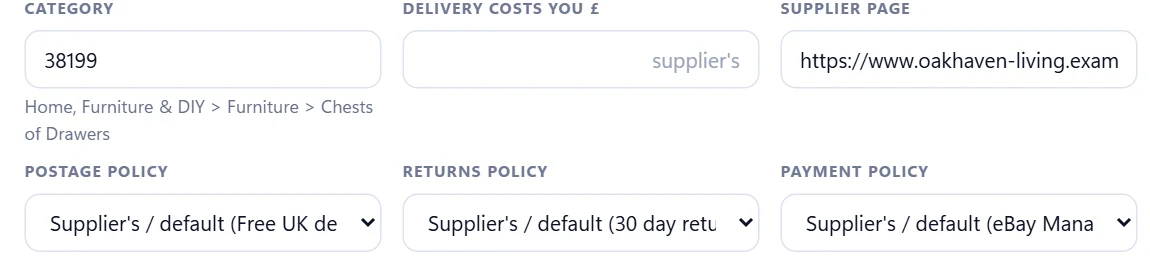
If a single product genuinely needs its own answer - a large or made-to-order piece from an otherwise-fast supplier, say - give that one product its own policy from the same dropdown. Changing a supplier's policy later is deliberately not instant and silent: Sellhelm asks first, and any product with its own override is skipped, so tightening a policy for the rest of a supplier's products can never quietly change the one you set on purpose.
Whichever policy ends up attached is also where the listing's own wording comes from. The dispatch and delivery time it states, and the returns window and who pays return postage, are worked out from the policy, not typed separately - so a listing's promises and the policy behind them can never drift apart.

If you are not sure which policy a product is on
Open the product in Sellhelm - the Postage, Returns and Payment fields each show either the supplier's policy or, if one has been set, the product's own override, in plain words rather than an ID you have to look up.
Step 6: Take your first product from supplier page to live listing
With policies attached, adding a product is the same for every supplier from here on - the same route the whole route into eBay dropshipping follows. Paste the supplier's product link (or, for a shop that blocks plain reading, use the Chrome extension's "Send this product" button on the page you are looking at). Sellhelm reads the price, stock, photos and specification and turns it into a draft - nothing is on eBay yet.
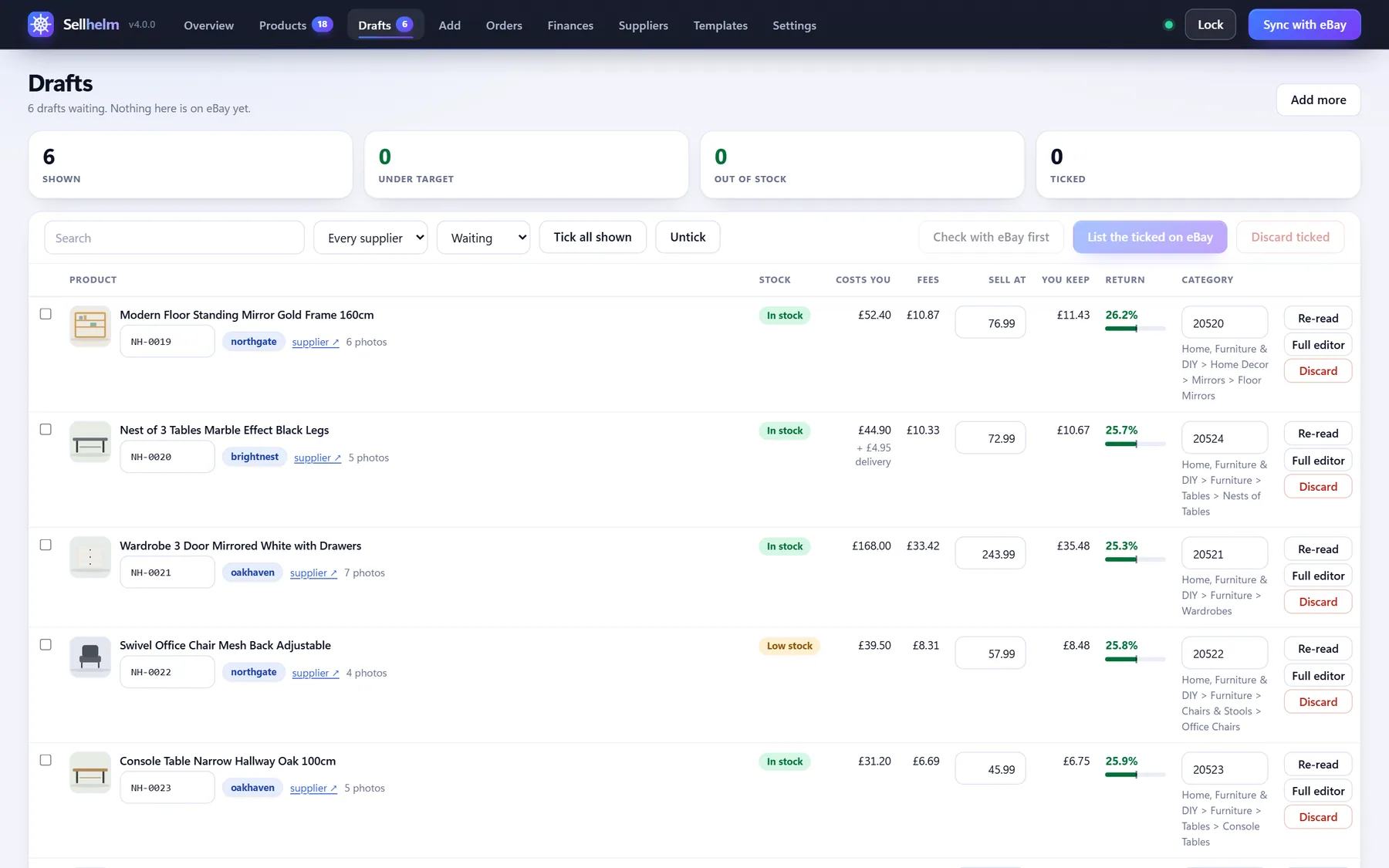
Once it is ticked, press Check with eBay first - it asks eBay whether it would actually accept the draft, and shows any warnings, missing item specifics or dropped photos, without creating anything. When you are happy, List the ticked on eBay sends it, built in one of five professional designs, filled in from the product, its photos, and whichever postage and returns policy its supplier carries.

Step 7: Keep policies honest as suppliers change
A supplier's real dispatch time is not fixed forever - a new courier, a slower quarter, a returns process that gets stricter. When you notice a change (or your own tracking starts showing it), update that supplier's policy in eBay first, then refresh it in Sellhelm. Every product built on that supplier's policy inherits the correction at once, rather than needing to be found and fixed one listing at a time.
That is the whole job: one honest policy per supplier, attached once, overridden only for the genuine exception, and refreshed when reality changes. Do that, check every draft before it goes live, and there should be very little left about a new listing that you have to stop and think about.
Questions people ask
What are eBay Business Policies?
The three settings, under Account in Seller Hub, that a listing draws its promises from: a postage (shipping) policy for dispatch and delivery time, a returns policy for the return window and who pays, and a payment policy. Every listing uses one of each.
Do I need a different policy for every supplier?
Not a different one for every product, but usually a different one per supplier, because suppliers rarely dispatch on the same schedule. One policy across a shop that uses several suppliers means it is wrong for at least one of them.
What happens if my stated dispatch time is wrong?
If it is shorter than your supplier really achieves, you will dispatch late. eBay tracks that, and it counts against your seller standards, which decide your fees and how visible your listings are - see eBay's own seller standards policy for the detail.
Can I set a policy for one product without changing the whole shop?
Yes. A product can carry its own postage, returns or payment policy that overrides its supplier's. Sellhelm keeps that override in place even if the supplier's own policy is later changed.