Features

Everything a supplier-fed eBay shop runs on.

Seven parts that work together, shown with the real screens and demo data. Every claim on this page is something the program does.

Overview

One screen for the whole shop

Open Sellhelm and the first thing you see is what you kept, and what needs you.

5
date ranges, from 7 days to the calendar year
5
stages in the order pipeline, one click from each list
1 min
and the page refreshes itself
7
setup steps that check themselves off

A getting-started checklist checks itself off as you set up, then goes away. Nothing here needs configuring.

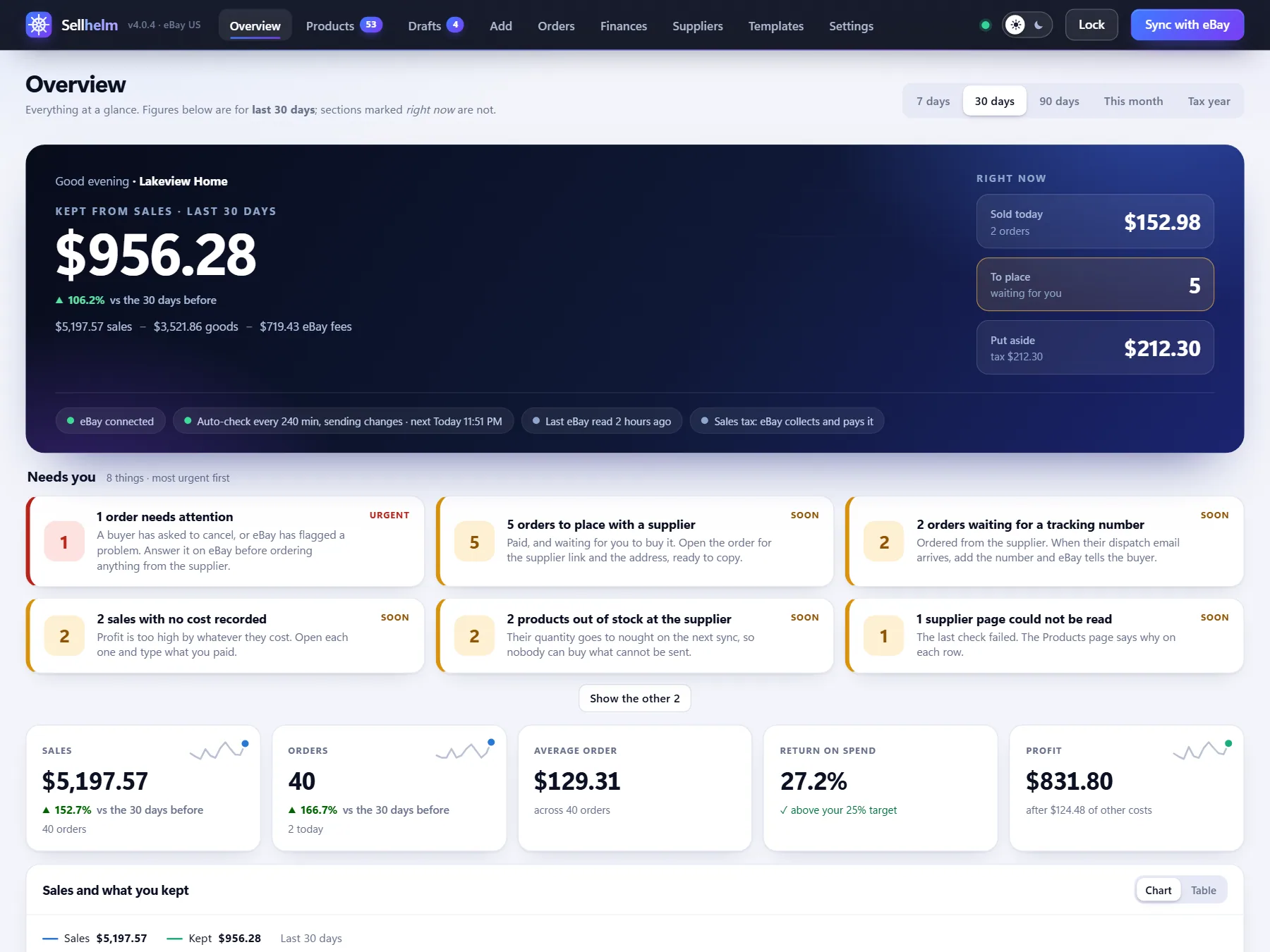
localhost:4173overview
Overview screen

The real screen, with demo data

  • What you keptSales minus goods minus eBay fees, for 7, 30 or 90 days, this month or the calendar year, with the change against the period before. The same books feed Finances, so the figures always agree.
  • A "Needs you" stripMost urgent first: orders past eBay's ship-by date, buyers asking to cancel, negative feedback, products out of stock, supplier pages that could not be read and drafts waiting. When nothing needs you it says so.
  • Five tilesSales, orders, average order, return on spend against your target, and profit, each with a trend line.
  • Where each dollar wentGoods, eBay, other costs and what was left, so you see what a sale really costs.
  • The pipelineTo order, waiting for tracking, on their way, delivered, and anything needing attention, one click from the right list.
  • The catalogHow many listings are in stock, low, out of stock or not on eBay, what they are listed at, and what they cost you.
  • Interest from eBayImpressions, views and click rate this week against last, plus how many people are watching and your most watched items.
  • Your suppliers and best sellersWhich shops make you money and which are giving trouble, and what you actually kept on your best sellers.

Pricing

Prices worked out from what you want to keep

You say what return you want on the money you spend. Sellhelm finds the price that gives it.

2
eBay fees counted on every price
25%
default target return
5
price endings, from .99 to none
$0.40
per order, or $0.30 on orders of $10 or under

Sellhelm refuses settings that would misprice your shop, such as a floor above a ceiling or a shipping cost with an extra zero, and tells you why.

localhost:4173products
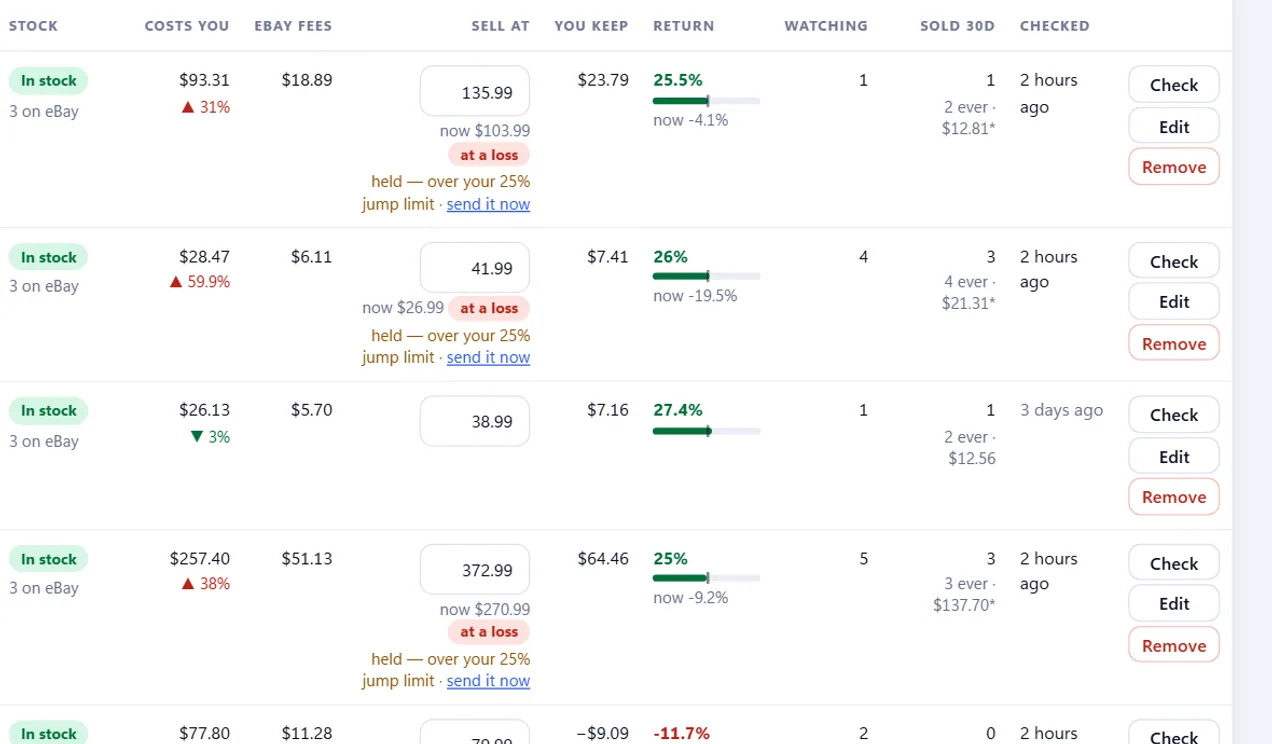
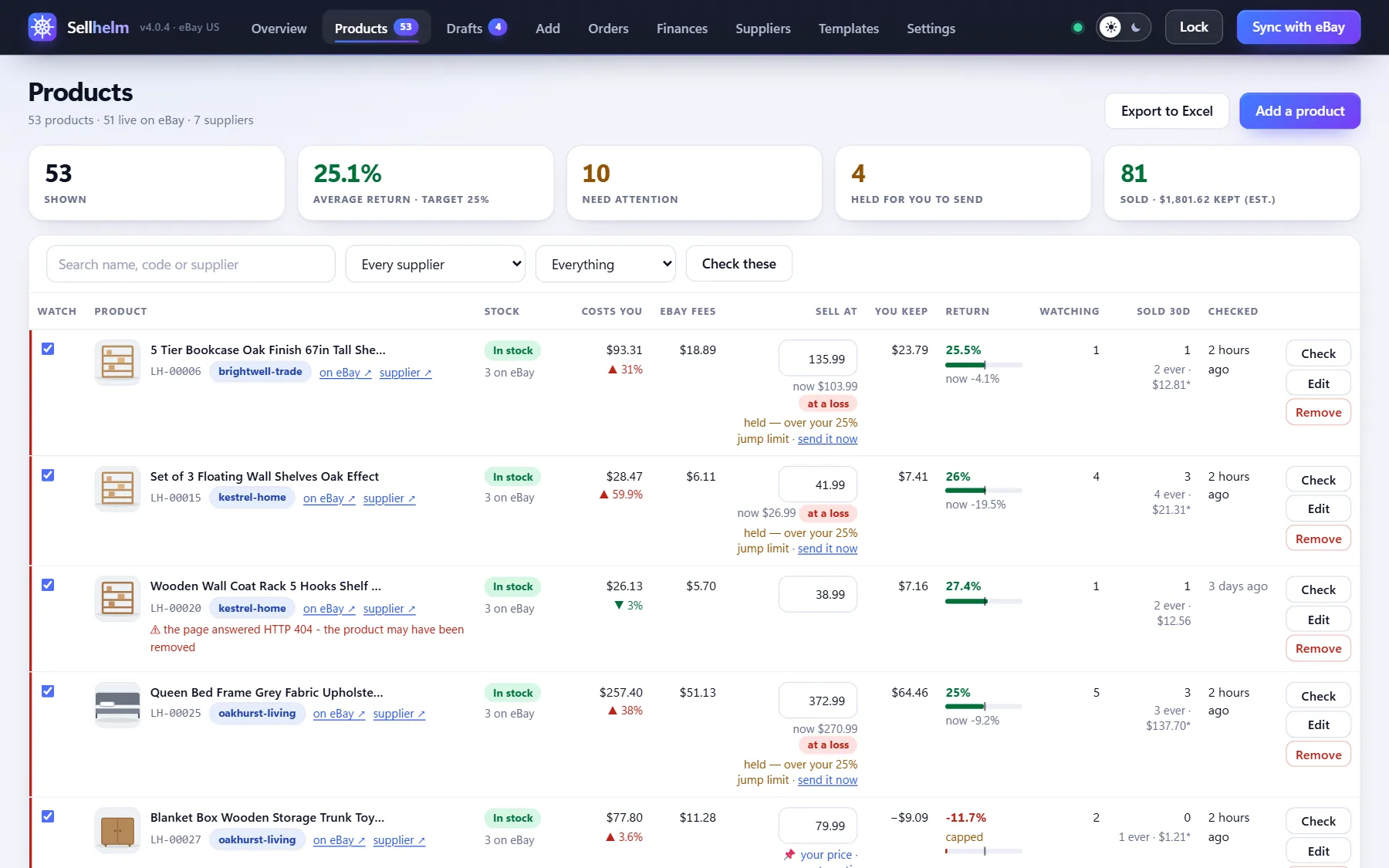
The pricing columns of the Products page: what each product costs you, eBay's fees, the price, what you keep and the return

The real screen, with demo data

  • Return on spend, not markupSpend $100, keep $25. Default target 25%, set it once or per product. A flat-markup mode exists too, and still shows what you keep.
  • Every fee, countedeBay's tiered final value fee and the per-order fee, which is lower on orders of $10 or under. Fees are charged on shipping too, so that is counted as well.
  • Fee rates you controlSellhelm starts from eBay US's standard business-seller rates, and every rate is a setting, so the sums stay right when eBay changes them.
  • Solved, not guessedThe price is solved directly, then checked against the real fee model and nudged until it lands on your target, for a $1 item and a $1,000 one alike.
  • Price endingsRound up to .99, .95, .49 or .00, or not at all.
  • Floors, ceilings and extrasNever list below or above a price, globally or per product. Add a fixed amount on top. Set what shipping costs you per shop or per product, and what you charge the buyer.
  • Pin your own priceSet a price by hand and automatic repricing leaves it alone, while still watching the cost and showing what the target would say.
  • See it before you set itType any price on a product and watch what you keep and your return change before you commit.
  • Sales tax stays out of iteBay collects and pays the sales tax on your eBay sales itself, so it is never in the price math and never taken out of what you keep.

Watching

It keeps watching, and it keeps you safe

Suppliers change prices and sell out. Sellhelm notices, and puts guard rails between a bad reading and your live listings.

25%
default jump limit, beyond which a change is held
100
changes per run at most, stock first
80%
of pages must read, or nothing is sent
30 min to 24 h
between checks, your choice

Automatic checks run while Sellhelm is open on your PC. It never ends a listing on its own: only the Remove button does, and it asks first.

localhost:4173products
Products screen
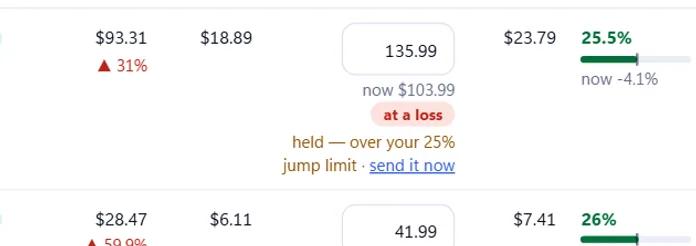
A held price change: the eBay price box shows a note saying it is held because it is over your 25% jump limit, with a Send it now link
A change held for you

The real screen, with demo data

  • A schedule you chooseCheck every 30 minutes up to every 24 hours (default 4), with quiet hours so it never runs when you would rather it did not. Choose "check only" to update your figures without touching eBay, or "check and send".
  • Big jumps are heldAny change beyond your limit (default 25%) waits for you, old and new side by side, with a Send it now link. A misread $1.99 cannot reprice a live listing.
  • Stock-outs still go throughWhile a price waits for you, a sell-out is still sent so nobody buys what you cannot get. A restock waits with its price.
  • It will not end a listing by accidentSellhelm reads eBay's out-of-stock setting first. If it is off, a stock-out is held and the Overview tells you how to switch it on.
  • Unknown is never acted onA page that cannot be read, or says something ambiguous, leaves your listing alone. "Unavailable" is never taken as "in stock".
  • A cap on changesBy default no more than 100 changes go in one run, stock changes first, the rest wait for the next.
  • A read-rate breakerIf fewer than 80% of the pages it could reach were readable, nothing is sent at all, in case a shop has changed its layout.
  • A record of every decisionEach check notes what it did to each product: sent, refused by eBay, held, deferred or unreadable, with the old and new figures and the reason.
  • Low returns are flaggedA live listing returning less than your "flag returns under" figure is marked, so nothing quietly stays a bad deal.

Drafts

Drafts you check before anything goes live

Adding a product never puts it on eBay. You look at it first, and eBay is asked before it is created.

0
things on eBay until you say so
24
photos per listing
500 px
the smallest photo kept
80
characters in a title, trimmed at a word

Shops publish text and photographs that belong to them. Check that you may use what you list.

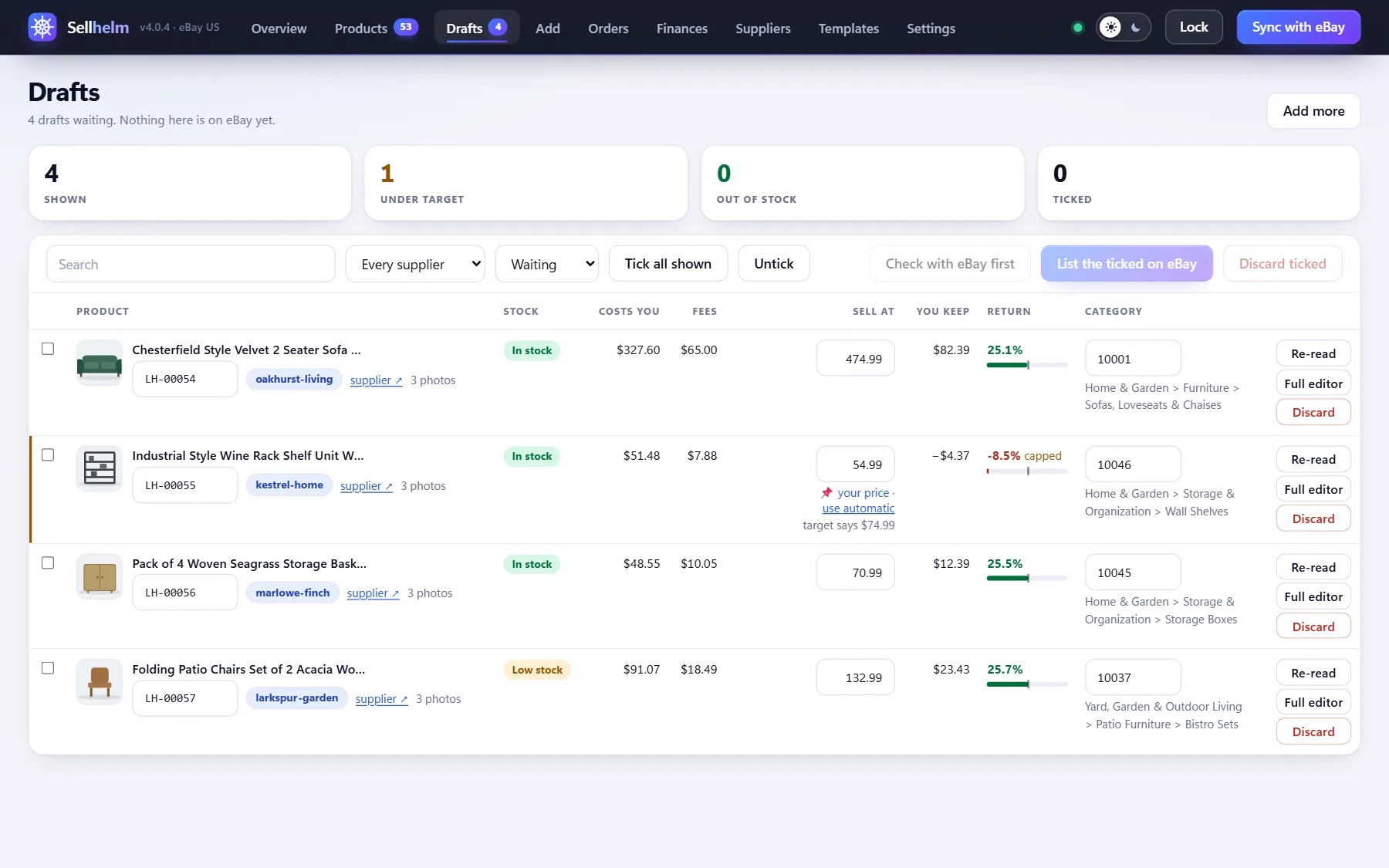
localhost:4173drafts
Drafts screen

The real screen, with demo data

  • Add many at oncePaste a list of links, one per line, and each becomes a draft. Or preview the first one to see the price, category, photos and description before adding.
  • Compare, then check the boxEach draft lays out the facts the listing will state, beside a link to the supplier's page, with a box for "I have compared these and they are right".
  • Ask eBay first"Check with eBay first" asks whether eBay would accept the checked drafts, and shows any warnings, missing item specifics or dropped photos, creating nothing.
  • List the checked onesOne button lists every checked draft. A double-click cannot create a duplicate, and a refusal puts the draft back.
  • The right categoryChosen from eBay's own suggestion and Sellhelm's word matching, and you can change it. Listings in retired categories are flagged.
  • Item specifics filled inSize, material, color and the like are read from the specification, in the units eBay expects, or left blank rather than guessed. Brand and MPN come only from your settings, never from the supplier.
  • Photos checkedEvery photo is measured. Under 500 px is dropped, under 1,000 px kept with a warning, up to 24 per listing, drag to reorder, and a product with no usable photo cannot be listed.
  • 80-character titlesTrimmed on a word boundary, with brand names stripped.
  • The supplier never showsThe send itself refuses any title, description, item specific, photo file name or address that names a shop, however it is spelled.

Designs

Listings that look like a shop, not a paste

Five designs, up to 24 photo slots, and wording that follows your own eBay policies.

5
designs, all filled the same way
1 to 24
photo slots per template
8
earlier versions of each template kept
0
scripts, forms or hosted images allowed in a template

Prefer to write your own? Every template has an HTML editor and a live preview.

localhost:4173templates
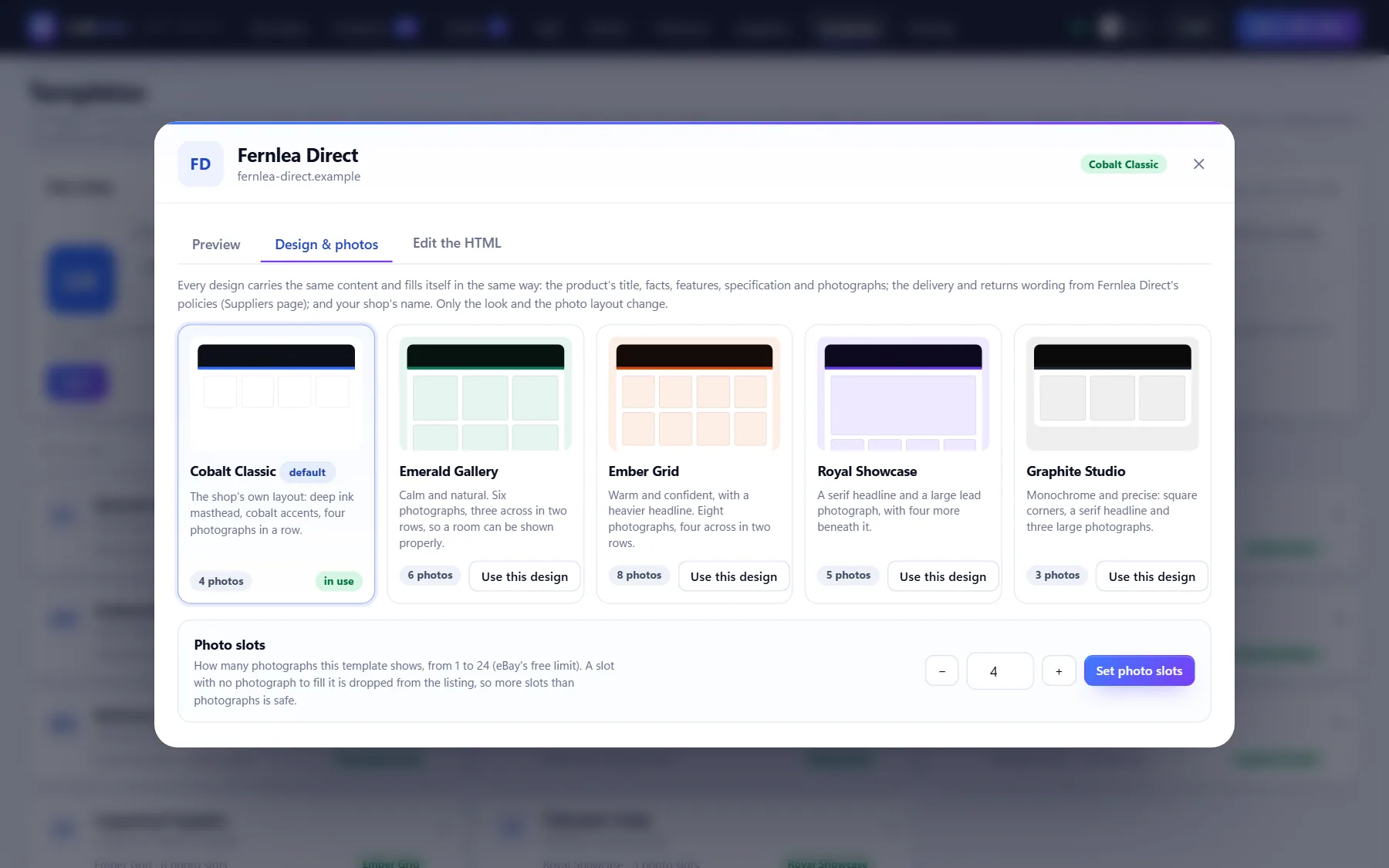
Templates screen showing the five listing designs

The real screen, with demo data

  • Five designsCobalt Classic (4 photos), Emerald Gallery (6), Ember Grid (8), Royal Showcase (5) and Graphite Studio (3). Every design fills itself the same way; only the look changes.
  • 1 to 24 photo slotsA slot with no photograph is dropped, so more slots than photos is safe. Photos are filled with eBay's own copies once the listing exists.
  • Your shop, everywhereYour shop name, tagline and initials tile or logo go on every listing. Change it once and it reaches them all.
  • Shipping and returns wording that is trueHandling and delivery times are worked out from the shipping policy you attach, and the return window and who pays return shipping from the returns policy. Refresh your policies from eBay and the wording follows.
  • Blocks that fill from the productAbout this item, feature cards from the supplier's own copy, In the box, a safety note, a specification table, how it reaches you, cancellations, returns and payment, and a Before you buy Q&A. A block with nothing to say is removed.
  • Nothing assumedAssembly (yes, no, or says nothing, never guessed) and size (large items get the access wording) adapt to what the page says. A used item is never called brand new.
  • Your own copy, with historyEdit any design as much as you like. Your last eight versions are kept, with one press to restore.
  • Safe by designTemplates cannot carry scripts, forms or hosted images, and a template that names a supplier is refused.

Orders

An order desk built around saving clicks

Orders arrive from eBay. Placing them with the supplier and telling eBay the tracking takes a fraction of the time.

8
address fields that copy on a click
5
stages from sold to delivered
90
days of eBay orders pulled in
0
buyer details ever stored

Buyer names, addresses and phone numbers are read from eBay each time you open an order and are never saved. A test in the program fails if that ever changes.

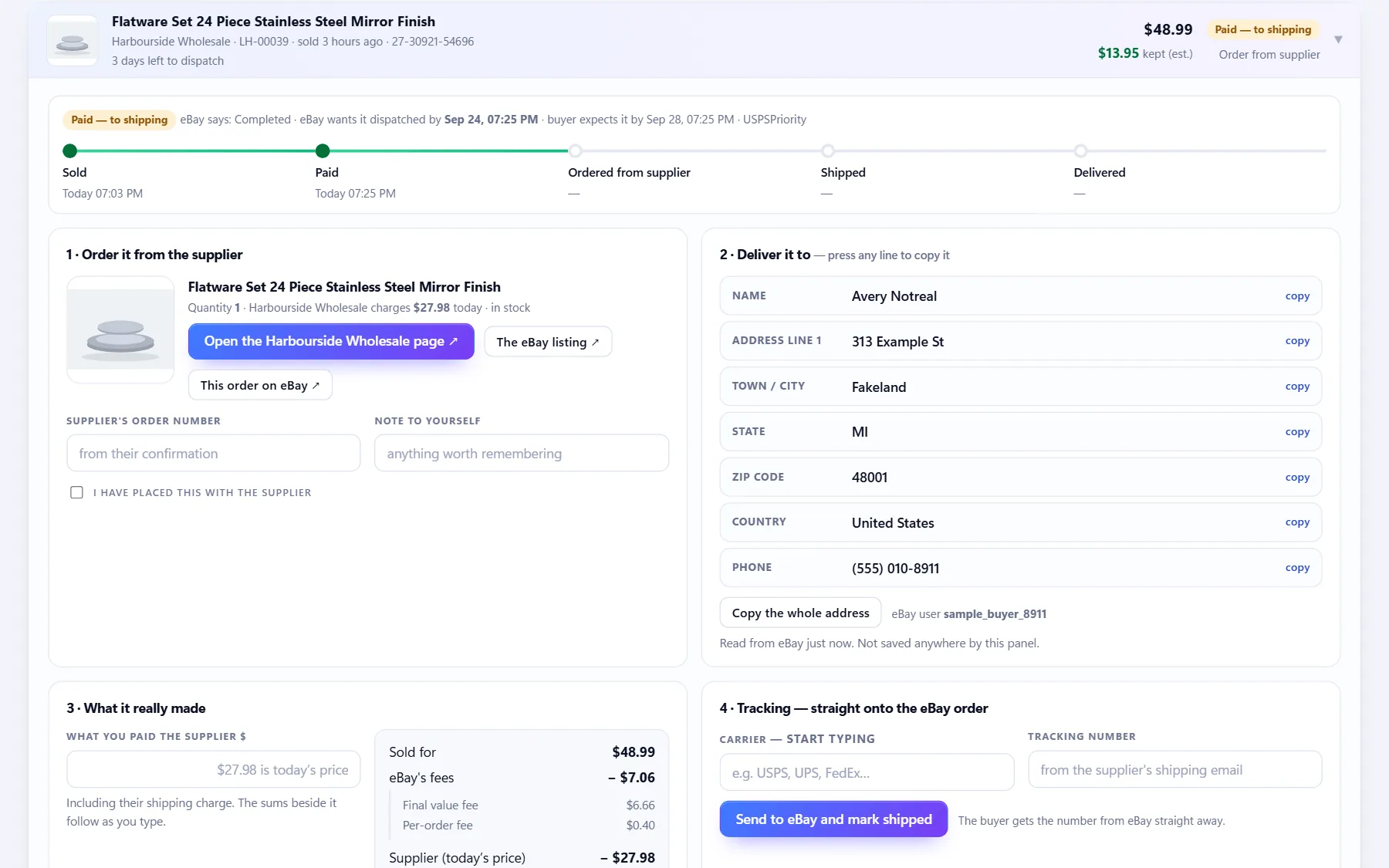
localhost:4173orders
The order desk with the delivery address in copyable parts

The real screen, with demo data

  • Real eBay statesAwaiting payment, paid and to ship, shipped, delivered, cancellation requested, canceled, refunded, with a journey line from sold to delivered.
  • Cards that are filtersTo order, waiting for tracking, on their way, delivered, need attention, canceled or refunded, and feedback received. Search by product, code, order number, tracking or supplier reference.
  • The deadline, plainDays left to ship, ship today, or how many days late, so nothing counts against you unseen.
  • The supplier, one click awayThe supplier's page with today's price and stock, and the eBay order, from the order itself.
  • The address in copyable partsName, address lines, city, state, ZIP code, country and phone, each copying on a click, plus the whole address at once.
  • Tracking straight onto eBayType a carrier (it knows eBay's carrier list) and a tracking number, and it goes onto the eBay order. Confirmed before it sends and switched off on canceled orders.
  • What it really madeType what you paid and it works out eBay's actual fees, your cost, what you kept and your return against your target, as you type.
  • Feedback watchedPositive, neutral and negative counts, and orders delivered with none yet. Only the type and date are kept, never the words.
  • Your history, tooSync brings in the last 90 days of eBay orders. For older ones, import a Seller Hub orders file.

Finances

The books, kept as you work

Bookkeeping that knows how eBay pays you and how the US tax calendar works, and an export your accountant can open.

4
estimated-payment dates: April 15 to January 15
12
expense headings, in the style of Schedule C
2
tax models: sole proprietor or single-member LLC, and corporation
$20,000
and 200 sales: where eBay reports to the IRS on a 1099-K

This is bookkeeping and estimates, not tax advice. It works out federal income tax, self-employment tax and one flat state percentage. It does not work out city or county taxes, retirement contributions, credits or losses carried forward. It says so on the page.

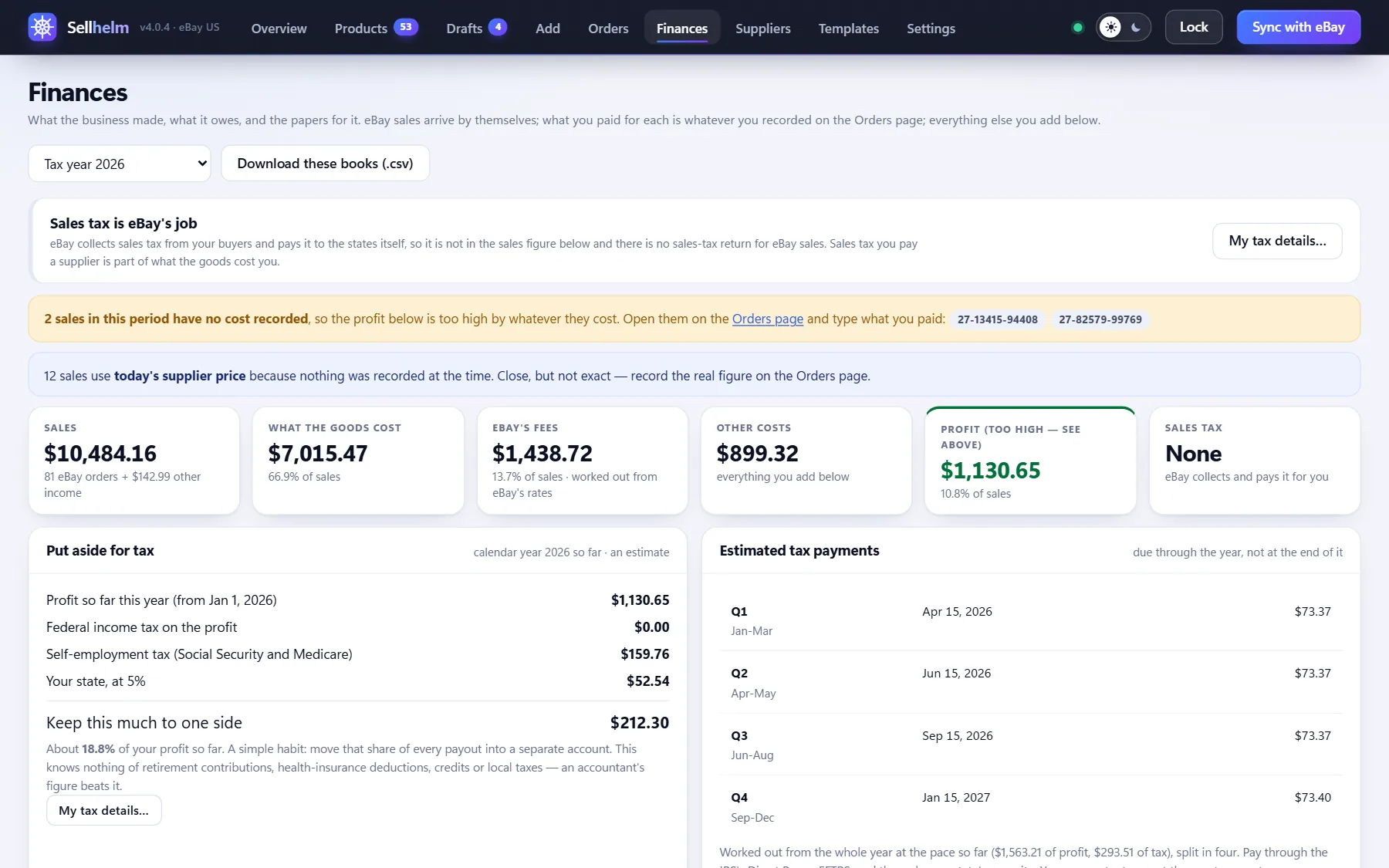
localhost:4173finances
Finances screen

The real screen, with demo data

  • Any periodPick a month, a quarter, the calendar year so far, or everything.
  • Sales to profitSales, what the goods cost, eBay's fees, other costs and profit, with a warning where a sale has no cost recorded.
  • Sales tax is eBay's jobeBay collects sales tax from your buyers and pays it to the states itself, so it is not in your sales figure and there is no sales-tax return for eBay sales. Sales tax you pay a supplier is part of what the goods cost you.
  • Tax to put asideAn estimate of federal income tax and self-employment tax on your profit, plus one flat percentage you set for your state. A corporation gets the flat federal rate. Every rate is a setting you can update each January.
  • The four payment datesApril 15, June 15, September 15 and January 15, each with an amount worked from the year so far, so tax is set aside through the year and not found at the end of it.
  • Form 1099-KShows what you have sold this year against the level where eBay reports to the IRS, over $20,000 and 200 sales, and reminds you that all profit is reportable whether or not a form arrives.
  • The calendar yearThe books run on the calendar year, from January 1, with a month-by-month table of sales, goods, fees, other costs and profit.
  • Your own costsAdd money in and out that is not an eBay order, under twelve expense headings in the style of Schedule C.
  • A CSV for your accountantEvery line, and how each cost was arrived at (recorded, estimated or worked out).

10 shops, and any other you paste.

Each built-in shop has its own reader, tuned on real pages, and eBay.com item pages are read through eBay's own API. Any other shop that publishes standard product data usually just works.

See how shops are read

And the parts that keep it dependable.

The Chrome extension

Reads the shops that turn programs away, and any shop that starts refusing Sellhelm, in your own browser. The Send this product button captures a page you are looking at. It opens only public shop pages, never eBay accounts, your network or local addresses, and never solves a captcha.

Backups and restore

A backup daily, and before anything risky. Export everything writes one file that restores onto a fresh install, and restoring is safe to do twice. Changing computer? "Moving to a new computer" at the top of Settings saves your data, price history and eBay connection in one file and brings it all across. Everything of yours lives in one data folder that updates never touch.

Panel lock

An optional password, a Lock button and an idle timeout of 5, 15, 30 or 60 minutes. Wrong guesses are slowed. The program keeps working while locked. It keeps onlookers out; it is not disk encryption.

Light and dark

A switch beside the Lock button. Light is the default; dark is the same panel, tuned.

A support report

One click writes versions, what is set up, counts and the latest log lines, with no keys, order details or buyer information, ready to send us.

Updates that keep everything

Run the new Setup over the top. Your data and eBay sign-in stay, and Setup stops the old version for you first.

Runs on your PC

It listens only on your own computer, refuses requests from other websites, and talks to eBay and your suppliers. The only thing it tells us is that a license was activated or revoked, and it checks a public list of canceled licenses once a day. No account, no analytics.

Tested

More than 700 automated tests, including the pricing math, the eBay sending, the supplier readers and the buyer-data rule, run before every release.

Take the helm of your eBay business.

From $129, once. Fourteen days to change your mind.

  • No subscription
  • Every 4.x update included
  • Runs on your own PC