
The short version
Your listing is a snapshot of your supplier on the day you made it. Both move after that: their stock changes as they sell to others, and their price changes with costs and promotions. Your listing does not move unless something moves it. The fix is a loop you run on a schedule:
- Readthe supplier’s page
- Understandin stock, low, out, or unknown
- Decidewithin your limits
- Sendto eBay
The hard parts are reading reliably, telling “out of stock” from “could not read this page”, and putting limits around automatic changes so one bad reading cannot do damage. This guide covers each, then shows how Sellhelm does it on 32 built-in shops and any shop you paste.
Why listings drift from your supplier
- Stock sells down. The supplier sells to others too, and the count you saw when you listed is gone within days for popular lines.
- Prices move. Costs change, promotions start and end, and suppliers reprice without telling their customers.
- Products are withdrawn. A discontinued line, a replaced model or a changed pack size leaves your listing describing something that is no longer sold.
- Options change. One color or size sells out while the product page is still live.
- Delivery changes. A supplier that shipped in two days now takes five, and your listing’s promise is wrong.
- The page itself changes. A redesign can move where the price and stock sit, which breaks any reader written for the old layout.
What a stale listing costs you
A sell-out you did not notice
A buyer pays for something you cannot get. You cancel and refund, and eBay counts a cancellation because you no longer have the item as a defect against your seller standards. Too many restrict your selling, and it is the most avoidable mark on your record. Worse, the buyer who wanted that item now has a bad experience with your shop.
A price rise you did not notice
Your price stays where it was, so every sale earns less. Here is an item that cost you $20.00 when you listed it at $29.99 for a 25% return (a flat 13.6% fee), as the supplier’s price drifts up and your listing does not:
| Supplier now charges | You still sell at | You keep | Return on spend |
|---|---|---|---|
| $20.00 | $29.99 | $5.23 | 26.1% |
| $22.00 | $29.99 | $3.23 | 14.7% |
| $24.00 | $29.99 | $1.23 | 5.1% |
| $26.00 | $29.99 | -$0.77 | -3% |
| $28.00 | $29.99 | -$2.77 | -9.9% |
A price rise of a few dollars can wipe out the profit, and a larger one makes every sale a loss until you notice. Multiply that by every sale and every listing.
A price fall you did not pass on
When the supplier’s price drops and yours does not, you keep a fatter margin on the few sales you make, but you sell less than a price that matched your new costs would win.
Time
Checking a shop’s pages by hand is the kind of job that gets skipped on the day it matters. The cost of checking is the reason most sellers drift.
How often to check
Match the frequency to how fast the supplier moves, and to how costly a miss is for that product:
| Supplier and product | Sensible check | Why |
|---|---|---|
| Popular lines, low stock counts, big marketplaces | Every 1 to 4 hours | Stock changes quickly and a sell-out costs you a defect. |
| Typical wholesalers and shops | Every 4 to 8 hours | Most stock and price changes are not minute-by-minute. |
| Steady or made-to-order lines | Once or twice a day | Little changes, and extra reads add load to the supplier’s site. |
More often is not always better. Reading a supplier’s site more often than it changes costs load on their servers, and can make a shop slow you down or block you. Sellhelm’s default is every four hours and you can choose anything from every 30 minutes to every 24 hours.
How a check works, step by step
- Read the page. Fetch the supplier’s product page, using the same address you added the product from.
- Find the price you would pay. Not the crossed-out price, not a club or member price, not another seller’s price on the same page.
- Find the stock. Out-of-stock wording first, then low stock, then in stock. If none of those can be established, the answer is unknown.
- Work out what the listing should now say. A new price that keeps your return, and a quantity that matches the stock.
- Check it against your limits. Is the jump too big, are too many changes pending, did enough pages read?
- Send what is safe, hold what is not, and record what happened to each product.
Why reading goes wrong
A reader that guesses will eventually reprice your shop on a misreading. These are the cases that cause it, and what a safe reader does:
- Several prices on one page. Delivery and collection prices, a bundle price, a price per pack. If it cannot tell which applies, a safe reader refuses the page.
- Crossed-out and club prices. Ignored. Only what you would actually pay counts.
- A redirect, maintenance or error page. It looks like a page but is not the product. Refused and retried later.
- A page the reader does not recognize. Your listing is left exactly as it was and the product is flagged.
- A robot check. A safe reader never tries to get past one. The product waits for a person.
- An empty shell. Some sites return a page with no product in it unless a real browser loads it. Those are read through your own browser instead.
The golden rule: unknown is never in stock
The most damaging bug in any sync system is treating “I could not tell” as “in stock”, because it leaves a sold-out item live. The reverse also hurts, because treating “unknown” as “out of stock” hides products that are available. The right answer is neither: do nothing and say so. Leave the listing exactly as it is, flag the product, and let a person look. Sellhelm does precisely this: when it cannot tell, nothing is changed, and the product shows “Cannot read supplier” on the Products page.
What quantity to list
Never list more than you are happy to sell. A supplier’s stock number is a moving target, and a small quantity limits the damage if the next check is a few hours away. A sensible policy:
| Supplier says | List quantity | Reason |
|---|---|---|
| In stock | A small number, for example 3 | Enough to sell, little to oversell. |
| Low stock | 1 | The last few units go quickly. |
| Out of stock | 0 | Nobody can buy what you cannot get. |
Those are Sellhelm’s defaults (in stock 3, low stock 1, out of stock 0), and you can change each one in Settings.
Out of stock: set the quantity to zero, or end the listing?
Setting the quantity to zero keeps the listing, its history and its search position, and lets it come back when the item does. Ending the listing removes it, and relisting loses that history. For dropshipping you almost always want zero, but it only works if your eBay account is set to keep out-of-stock listings live.
- In eBay go to Account, then Site preferences, then Sell.
- Find Use the out-of-stock option and switch it on.
- Fixed-price listings can now sit at zero and come back, instead of ending when the quantity hits zero.
If it is off, setting a quantity to zero ends the listing for good. Sellhelm reads this setting before it acts. If it is off, a sell-out is held rather than sent, and the Overview shows the warning “eBay will END your listings when a supplier runs out” with the fix.
What to do with price changes
- Reprice to your target return, not to the supplier’s change. When the supplier’s cost moves, work out the price that keeps the return you chose, with eBay’s fees for the category. See pricing after eBay’s fees.
- Hold large jumps. A big sudden change is as likely to be a misread page as a real price rise. A human should look.
- Keep a floor and a ceiling. The price never goes below break-even or above a sane maximum, whatever a reading says.
- Decide what to do with a price fall. Passing it on wins sales; holding it keeps margin. Either way it should be a choice and not an accident.
- A pinned price stays pinned. If you set a price by hand for a product, an automatic check should respect it and only warn you if its return changes.
Guard rails that make automatic changes safe
Automatic changes are only as safe as their limits. These are the protections to look for, with Sellhelm’s defaults where it has them:
| Protection | What it does | Sellhelm default |
|---|---|---|
| Hold big jumps | A price move beyond a set percentage waits for your approval, old and new side by side. | 25% |
| Stock-outs still go through | While a price waits, a genuine sell-out is still sent, so nobody buys what you cannot get. A restock waits with its price. | On |
| Cap on changes per run | A fault cannot rewrite the whole shop at once. Stock changes go first; the rest wait for the next run. | 100 |
| Stop if too many pages fail | If fewer than this share of pages can be read, the supplier has probably changed its site. Nothing is sent and you are told. | 80% must read |
| Unknown changes nothing | A page that cannot be read leaves the listing alone. | Always |
| Low-return warning | Flags a product whose return has slipped under a level. A warning, not a block. | 8% |
| Quiet hours | No changes go out during hours you choose. | Off until set |
| A record of every decision | For each product, what the check did (sent, refused by eBay, held, deferred or unreadable), with old and new figures and the reason. | Always |
When a supplier’s site refuses to be read
Some shops detect programs and refuse them, often with a robot check. What matters is how a tool responds:
- It never tries to solve or get past a check. That is both unreliable and, in many shops’ terms, not allowed.
- It backs off. Sellhelm leaves a refusing shop alone for 15 minutes.
- It hands over to your own browser for shops that need one: Sellhelm’s Chrome extension opens the public product page in a background tab, reads it and closes it, up to four pages a cycle. It never opens your eBay account.
- It gives up gracefully. After five failed tries a page is set aside for a day, or you press Retry, and the product shows as waiting on your browser.
Most built-in shops are read directly or gently. How each is read is listed on the suppliers page.
The safety net at order time
Even with checking, something can change between the last check and a sale. Make the order moment a second check. On Sellhelm’s Orders page, an order still to place shows “Out of stock at the shop” if the supplier has sold out, and “Price up N%” if the cost has gone up, before you order. If the item is gone, message the buyer straight away, offer a replacement or a refund, and cancel through eBay. If the price is up, you can still choose to fulfill, and your Finances will show the true profit because you record what you paid.
By hand, in a spreadsheet, or with a tool
| By hand | Spreadsheet | A tool such as Sellhelm | |
|---|---|---|---|
| Best for | A handful of listings | A few dozen listings and a supplier feed | Dozens to thousands of listings |
| Reads pages | You, in a browser | You paste or script it | Automatically, on a timer |
| Knows “unknown” | Your judgment | Only if you build it | Built in |
| Safety limits | Your attention | Only if you build them | Jump hold, change cap, read-rate stop |
| Cost | Your time | Your time and upkeep | One payment |
- Once or twice a day, open each supplier product page for every live listing.
- Note the price and stock, and compare with your listing.
- Change the eBay quantity and price where they differ, using your price formula, not a guess.
- Log the date and what you changed.
It works for a dozen listings and falls apart at fifty, which is when most sellers turn to a tool.
How Sellhelm keeps listings in step
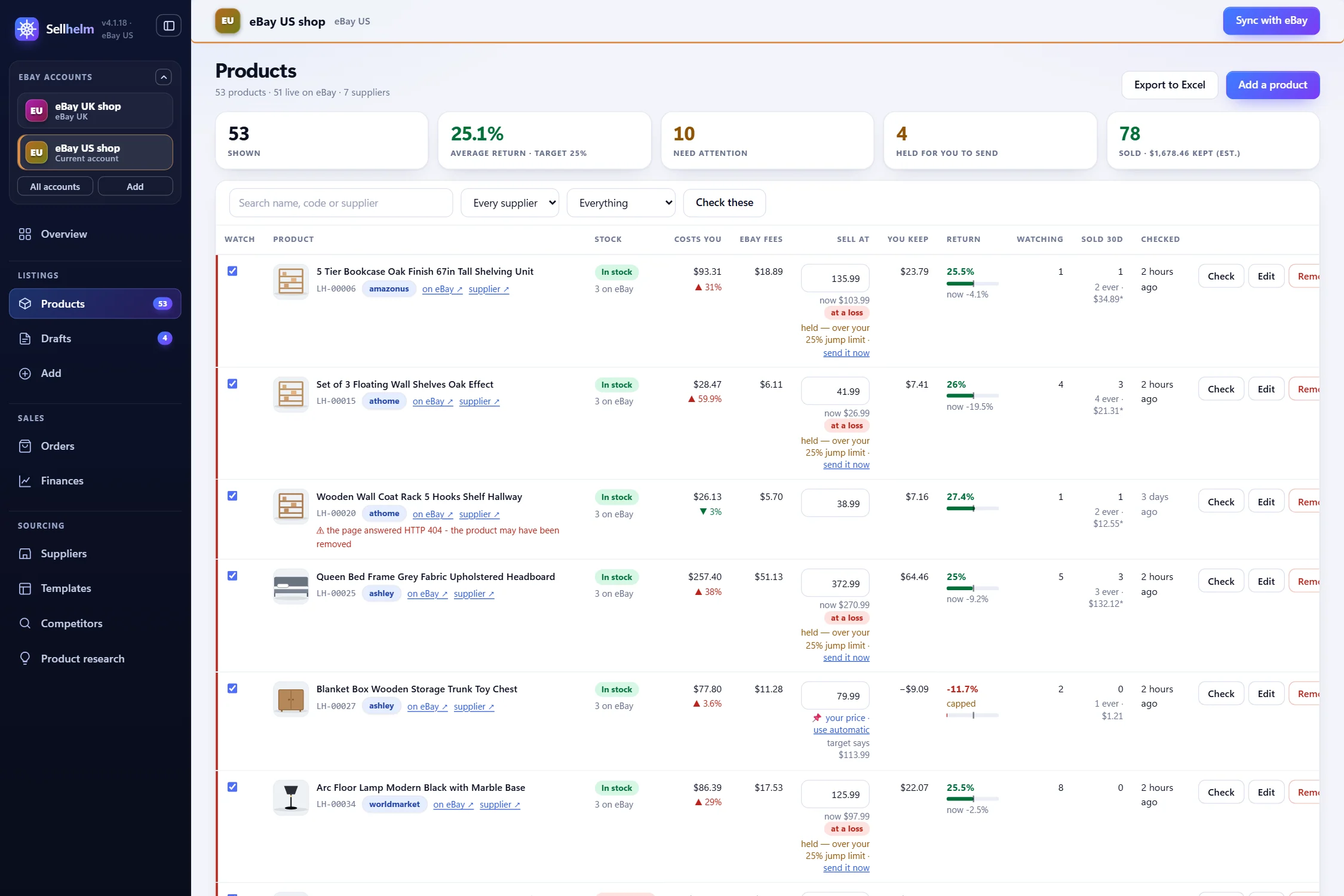
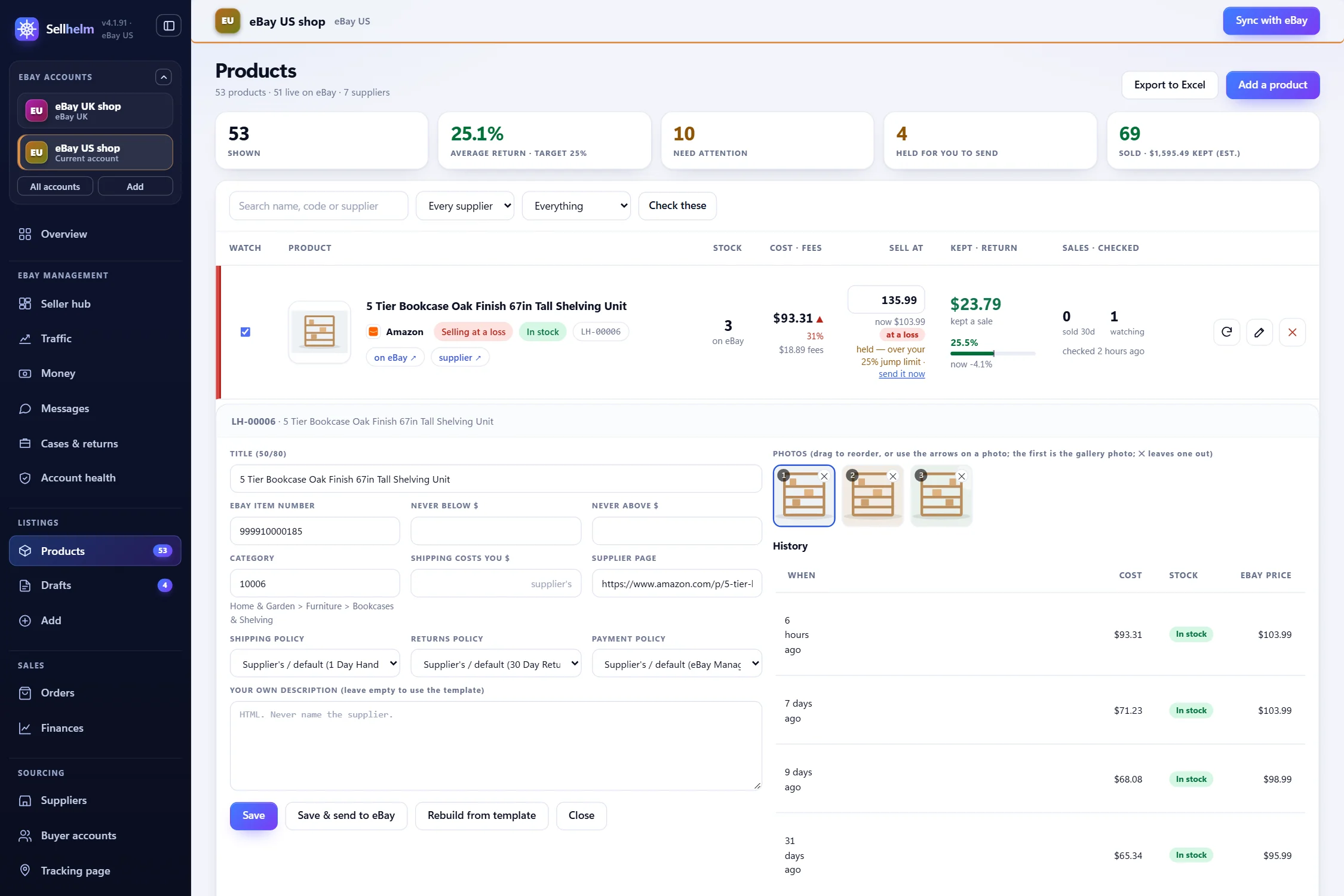
The Products page is where Sellhelm watches for you. Each product has a Watch tick; watched products are re-read on a timer, and Sellhelm works out what the listing should now say. Every product shows its cost, eBay’s fees, the price, what you keep and the return, with chips for anything that needs you.
- Open Settings, then Automatic checking.
- Tick Check my suppliers on a timer and choose how often. Start with every four hours.
- Leave and send the changes to eBay off for the first few days. Watch what it finds on the Products page.
- When you trust it, tick and send the changes to eBay. Set any quiet hours.
- Open Safety limits and check the jump limit (25%), most changes in one run (100) and the read-rate stop (80%). Press Save settings.
- Leave Sellhelm running. The timer lives in the panel, so keep its window open and your PC on.
If you want the whole process around this, from the first listing to orders and tracking, read how to dropship on eBay US with Sellhelm. To compare any tool with a checklist, see what to look for in eBay dropshipping software.
When something looks wrong
- “Cannot read supplier”. The page could not be read this time. Nothing was changed. Press Check now; if it persists, open the page yourself and see whether the product still exists.
- “Price change held”. The new price is more than your jump limit above or below the old one. Look at old and new, and press “send it now” if it is genuine.
- “Browser behind”. The shop needs your Chrome and the extension has not caught up. Check Chrome is open, with Sellhelm running.
- “No file was written”. Fewer pages read than your read-rate limit, so a run sent nothing. The supplier has probably changed its site; check the Suppliers page and press “Check all suppliers”.
- “eBay will END your listings when a supplier runs out”. eBay’s out-of-stock option is off. Switch it on in eBay as shown above.
Mistakes to avoid
- Treating “could not read” as “in stock”.
- Listing large quantities of something you do not hold.
- Letting a misread price reach a live listing with no limit on the size of a change.
- Leaving the out-of-stock option off and then ending listings by accident.
- Checking so often you get blocked, or so rarely it does not matter.
- Never looking at the record. A pattern of refusals or unreadable pages tells you a supplier has changed.
- Assuming a sync tool removes your responsibility. You remain the seller, and the delivery promise is yours.
Questions people ask
How often should stock and prices be checked?
As often as your riskiest supplier changes. For most sellers a check every few hours is enough. More often costs load on the supplier’s site and rarely changes outcomes.
What if a supplier changes its website layout?
Automatic readers can misread a changed page. A good tool notices when a large share of pages can no longer be read, stops sending changes, and tells you.
Should price changes be automatic?
Small ones can be. Large ones should wait for you. Set a limit (for example, hold any move bigger than 25%) so one bad reading cannot reprice a live listing.
Does an out-of-stock cancellation hurt my eBay account?
Yes. eBay counts canceling because you no longer have the item as a defect against your seller performance. It is the most avoidable mark on your record.
What quantity should I list for a dropshipped item?
A small one. A supplier’s stock figure moves, so listing three when it is in stock and one when it is low limits the damage if the next check is a few hours away. Sellhelm defaults to 3, 1 and 0.
Should I set a sold-out item to zero or end the listing?
Almost always zero, with eBay’s out-of-stock option switched on, because the listing keeps its history and comes back when the item does. If the option is off, zero ends the listing for good.
What does a sync tool do when it cannot read a page?
A safe one changes nothing and flags the product. Treating “could not read” as “in stock” leaves sold-out items live, and treating it as “out of stock” hides items that are available.
Will checking my supplier’s website too often get me blocked?
It can. Reading a site far more often than it changes costs the supplier load and can trigger blocks. Check as often as the product really changes, and let a tool back off when a shop refuses.
Can I do stock and price sync by hand?
For a handful of listings, yes: check each supplier page once or twice a day, compare with eBay, and use your price formula for changes. It stops being practical at around fifty listings.
What happens if a supplier is out of stock after someone has bought?
You are responsible to the buyer. Message them straight away, offer a replacement or a refund, and cancel through eBay. The best protection is to check often and list small quantities so it rarely happens.