
Who this is for. You have never sold on eBay, or you have sold a little and never from suppliers. By the end you will know how every part of the job works, what to click in which order, and how to run the whole shop from one program. Read it in order the first time, then use the list on the left to jump back to any step. Fee and policy facts were last checked against eBay US’s own pages on 10 October 2026.
How dropshipping on eBay works, and where Sellhelm fits
Dropshipping on eBay means you list items you do not hold. A buyer pays you. You then buy that item from a supplier, who sends it to your buyer. You never touch a parcel, but you are the seller: eBay, your buyer and the law all treat you as responsible for the item arriving, arriving on time, and being as described.
Most of the work is not hard, it is repetitive: reading supplier pages, redoing the sums when a price moves, checking stock, copying delivery addresses, chasing tracking numbers, working out what you actually made. Sellhelm is a Windows program that runs on your own PC and does that work. Because it connects straight to your eBay account, you can do almost all of the job without ever opening eBay: find products, build listings, publish them, keep prices and stock right, take orders, send tracking, answer buyers and see your profit and tax.
Every job in this guide follows one loop, and Sellhelm has a page for each part of it:
- FindProduct research, Competitor research
- AddChrome extension, Add page
- CheckDrafts, titles, photos, VeRO
- ListOne click to eBay
- WatchPrice and stock, on a timer
- OrderOrders page, Amazon auto-order
- TrackTracking back to eBay
- CountFinances, tax estimates to put aside
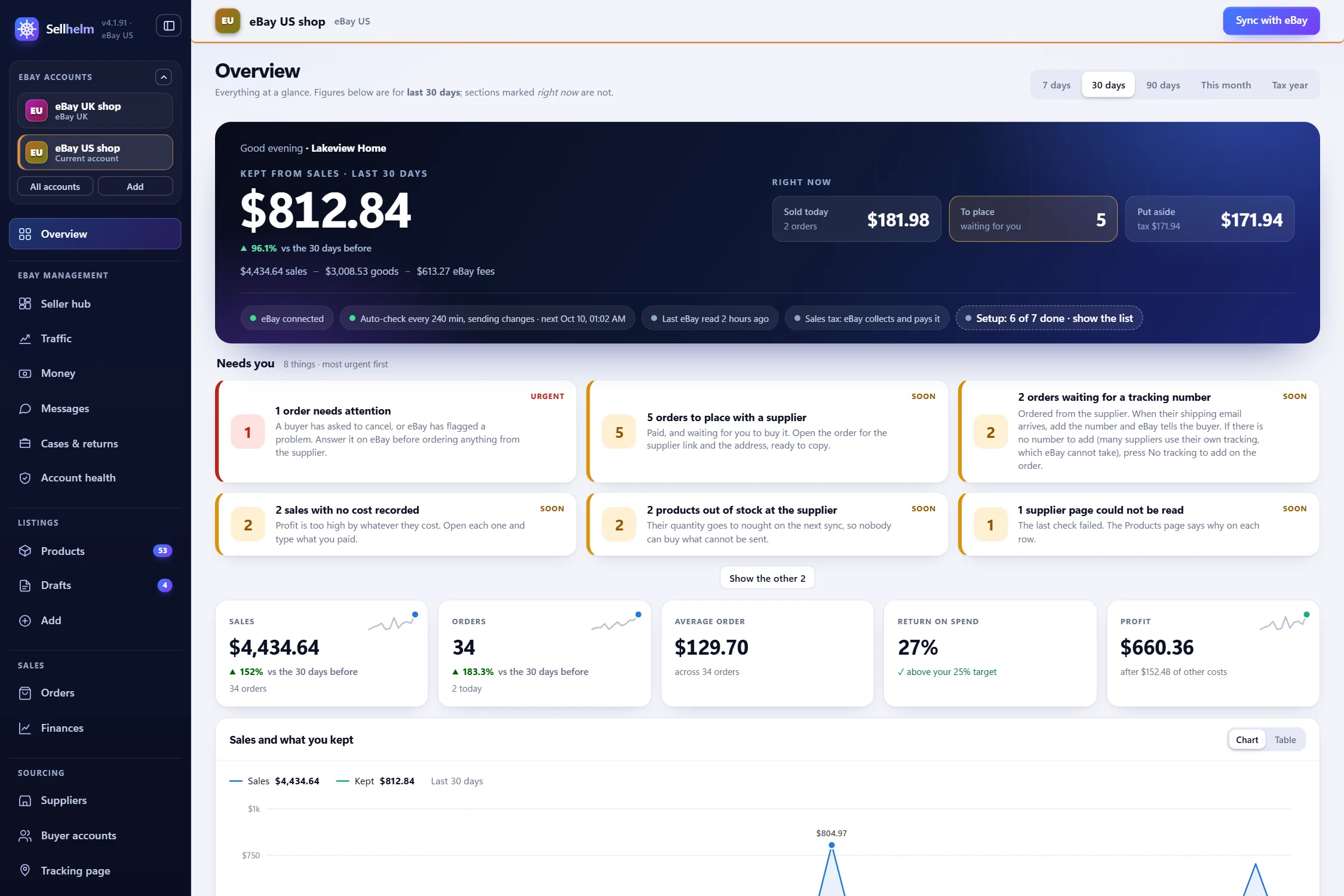
Two honest points before we begin. First, dropshipping is not a guaranteed income: the margins are thin, eBay’s fees are large, and no software changes that. What software can do is make sure your sums are right, your listings are accurate and nothing slips through. Second, you remain the seller. You choose the suppliers, you follow eBay’s rules and each supplier’s terms, and you answer to your buyers. This guide shows you how to do that well. If you would rather see the program working first, the live demo is a made-up shop with everything locked, so nothing can break.
Part 1 · Getting ready
Before you start: what you need
- An eBay seller account you can sell on. Sellhelm connects to your account; it does not create one. (Step 1 below.)
- A Windows 10 or 11 PC that you can leave switched on while Sellhelm checks your suppliers. There is no Mac version.
- Google Chrome. Sellhelm’s extension runs in Chrome, and some shops are read through it.
- Free eBay developer keys of your own. Sellhelm talks to eBay through eBay’s official program interface, and eBay issues the keys to one seller at a time. They take about 15 minutes to get, once (Step 4).
- Some working cash. You normally pay the supplier before eBay pays out to you, and a refund comes out of your pocket first.
- A first idea of what to sell. You do not need one yet: Step 7 shows how to find products that sell.
Allow about half an hour from download to a working setup. The longest part is waiting for eBay to approve a developer account, which can take up to a day.
What every sale costs you (the sums that decide everything)
Before you list anything, understand where the money goes. For every sale, eBay takes a final value fee on the total amount of the sale, shipping included. For most categories it is 13.6% of the sale up to $7,500 (2.35% on any part above that), and it varies by category, plus a per-order fee ($0.30 on orders of $10 or less, $0.40 above). eBay collects and pays sales tax itself, so it is not part of your income, but it works its fee out on a total that includes it, so Sellhelm allows a typical 7% for that. Then there is your supplier’s price, any delivery they charge you, and the cost of returns. Our free eBay fee calculator has eBay’s rate for every category built in.
The result is that cheap items rarely work. Here is what happens to an item costing you $10.00, $20.00 and $60.00 in total when you aim to keep a 25% return on what you spend, using a typical 13.6% fee (your category’s rate may differ):
| It costs you | You must sell at | eBay takes | You keep |
|---|---|---|---|
| $10.00 | $15.99 | $2.73 | $3.26 |
| $20.00 | $29.99 | $4.76 | $5.23 |
| $60.00 | $88.99 | $13.35 | $15.64 |
Sellhelm does exactly this sum for every product, automatically, using eBay’s real rate for the product’s category. You choose the return you want; it works out the price. More on that in the pricing step. For the full method see our guide to pricing after eBay’s fees.
Step 1: set up your eBay seller account
This happens on eBay, not in Sellhelm, and it is worth doing properly because some of it takes time.
- Open a business seller account. If you sell regularly to make a profit you are trading, and eBay and the law treat you as a business. Choose a business account and give your real details.
- Complete eBay’s identity checks and payout set-up straight away. They can take days, and you cannot be paid until they are done.
- Read eBay’s seller standards. They explain the late-shipping, cancellation and returns measures that decide your seller level.
- Expect selling limits at first. New accounts commonly start with a cap on how many items and how much value you can sell each month. Sellhelm’s Account health page shows your seller level and your selling limits, so you can see where you stand.
- Turn on the out-of-stock option. In eBay go to Account, Site preferences, Sell, and tick “Use the out-of-stock option”. This lets a listing sit at zero stock instead of ending for good when your supplier runs out. Sellhelm checks for it, and its Overview warns you if it is off.
- Keep records from day one. The IRS explains how business income and self-employment tax work. Sellhelm’s Finances page keeps your books and tracks your tax estimate and Form 1099-K figures (Step 13), but the legal duty is yours.
Step 2: set up your eBay business policies (shipping, returns, payment)
Business policies are three reusable sets of rules that every listing points to: how you post (shipping), what you accept back (returns) and how you are paid (payment). Setting them once means every listing Sellhelm builds follows the same, correct rules instead of each listing being filled in by hand.
You create the policies on eBay (in Seller Hub, under Account, Business policies); Sellhelm reads them and lets you choose which one each listing, supplier or product uses. It does not create or edit them for you, and the names must match eBay exactly, which is why Sellhelm reads them from eBay rather than asking you to type them. If eBay asks you to opt in to business policies, do so.
- Shipping policy. Free delivery is the strongest choice for dropshipping, because it keeps the price simple and buyers filter by it. Set the handling time to what your supplier can honestly do, with room to spare: the time on your listing is a promise you must keep, whoever ships. Choose the delivery service the supplier’s speed supports.
- Returns policy. Offer returns. eBay’s Money Back Guarantee protects your buyers whatever you choose, and a clear policy reduces disputes. Thirty days is a common choice. Decide who pays return shipping and keep it consistent.
- Payment policy. eBay handles payment, so this is normally immediate payment, and there is little to decide.
You will connect Sellhelm to eBay in Step 4 and then press Refresh policies from eBay. Sellhelm reads your policies, and you pick the ones to use by default in Settings, Listing defaults. A supplier can have its own policies (a slow supplier can point to a policy with a longer handling time), and so can any single draft or product. If you set none, the shop default applies. Sellhelm also writes the delivery and returns wording in each description from the policy you chose, so the words and the policy cannot disagree.
Step 3: install and activate Sellhelm
Once you have bought Sellhelm (see the packs), create your password on the thank-you page, sign in to your account, and download Sellhelm-Setup from the Licenses page. Double-click it. The wizard asks one or two questions (a Desktop icon, whether to start with Windows) and installs into your own user folder, so it never needs an administrator password. Sellhelm brings its own copy of everything it needs, so there is nothing else to install.
Windows will probably warn you. Sellhelm is a small independent program, so Windows’ SmartScreen shows a blue “Windows protected your PC” screen the first time. That is Windows being cautious about any new program, not a fault. Click More info, then Run anyway. Your download page shows the file’s fingerprint (SHA-256) if you want to check it is genuine.
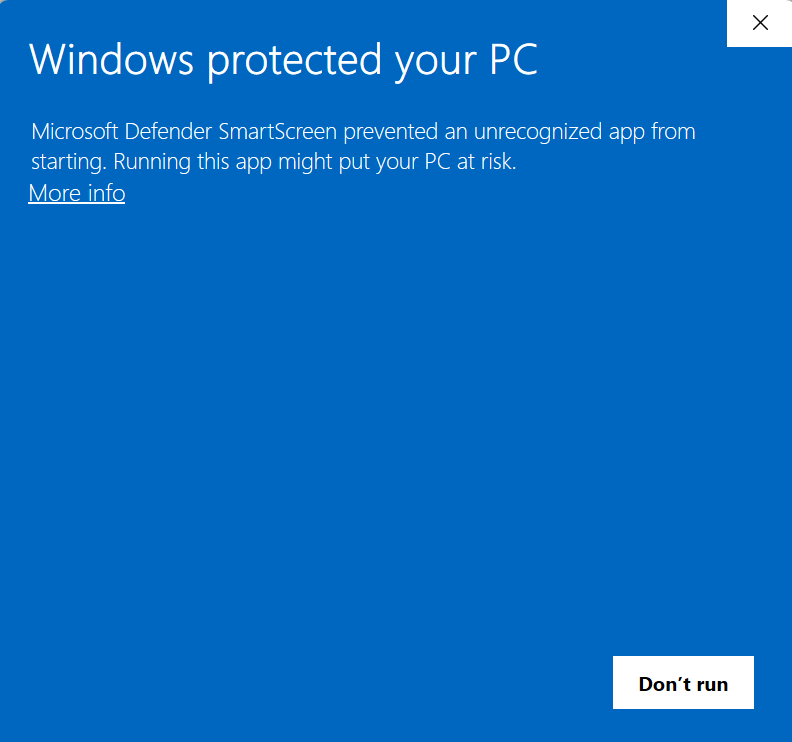
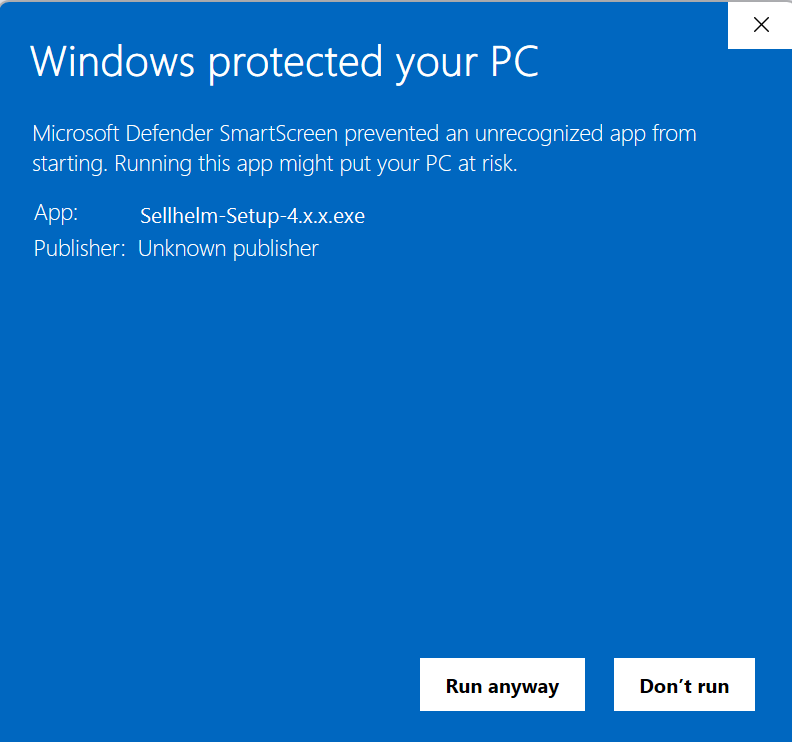
When Setup finishes, tick “Open Sellhelm now”. A small Sellhelm icon appears by your clock and your browser opens the control panel (an ordinary web page that lives only on your PC). The first thing it shows is Activate Sellhelm. One license covers one PC, and Sellhelm connects to our website once to confirm it.
- On the Activate screen press Copy next to your Machine ID.
- On our website, sign in to your Sellhelm account, open the license and paste the Machine ID.
- Press Get my key. The key starts with “SM1.” and is also emailed to you (check your spam folder).
- Paste the key into Your license key in the panel and press Activate.
That is the only time Sellhelm needs to confirm anything online; after that it works offline apart from a quiet daily check for canceled licenses. The panel then walks you through adding the Chrome extension (see the extension guide): from the Windows Start menu choose Sellhelm, then “Set up the Chrome extension”, and follow the window. If a step goes wrong, the how it works page lists the common fixes (antivirus complaints, a port already in use, a forgotten panel password).
Optional but sensible: Settings, Panel lock lets you set a password so nobody else at your PC can open the panel. Sellhelm keeps checking and syncing while it is locked.
Step 4: connect Sellhelm to your eBay account
Open Settings and find the eBay connection card. It has three numbered blocks: developer keys, sign in to eBay, and check it.
Get your free eBay developer keys (once, about 15 minutes)
Sellhelm uses eBay’s official program interface, and eBay requires every seller to use their own keys. That is a feature as well as a rule: your usage limits are yours alone and nobody else’s traffic can affect your account. The card has a collapsed “I have not got these keys yet, show me how” guide open by default; here is the same path:
- Register for a free account at developer.ebay.com. It is a separate account from your seller account, and approval can take up to a day.
- Under Application Keys, name your application anything you like and press Create a keyset under Production (not Sandbox).
- eBay asks about “Marketplace Account Deletion”. Choose Exempted from Marketplace Account Deletion and tick “I do not persist eBay user data”. That is true of Sellhelm: it keeps no buyer details.
- Copy the App ID (Client ID), Dev ID and Cert ID (Client Secret).
- Make a RuName: under User Tokens choose “Get a Token from eBay via Your Application”, then “Add eBay Redirect URL”. Use your shop name as the display title and the address shown in Sellhelm’s own guide on that card (it ends in /ebay-connected) as the “auth accepted” address (the declined and privacy addresses can be any https address). Tick OAuth and copy the RuName it gives you.
- Paste all four into Sellhelm’s boxes and press Save keys. They are write-only: once saved, Sellhelm shows “saved” and never displays them again.
Sign in to eBay, then test
Press Sign in to eBay. Sellhelm opens eBay in the account’s own Chrome window; sign in with your selling account and press Agree. Sellhelm completes the connection itself, and the sign-in lasts about 18 months. Then press Test the connection, Refresh policies from eBay (so Step 2 takes effect) and Sync with eBay, which brings any listings you already have into Sellhelm as products, with watching switched off until you decide.
More than one eBay account, or eBay.com
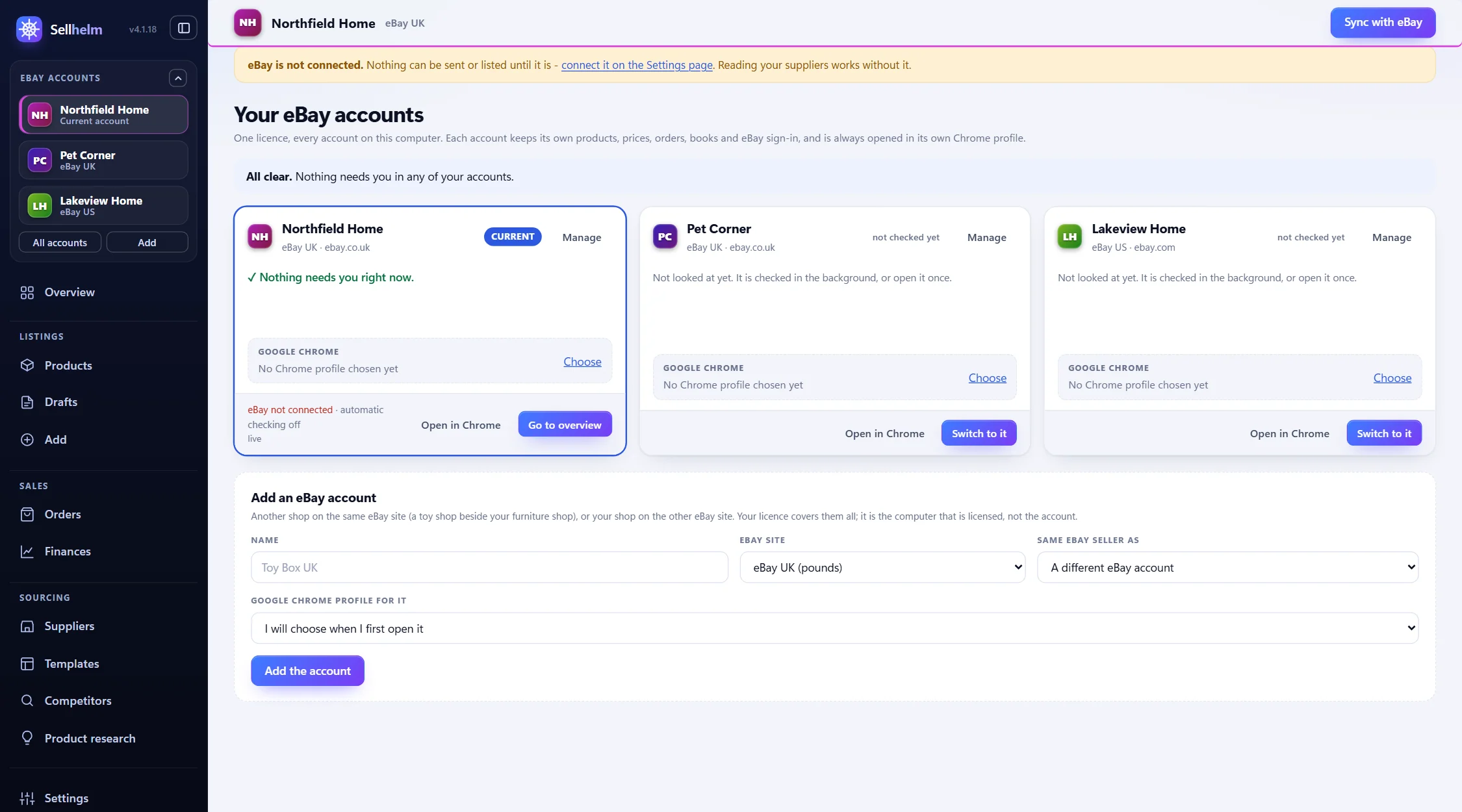
The Your eBay accounts page lets one license run several eBay accounts, UK and US, each completely separate (its own products, orders, books and sign-in) and each with its own Chrome profile. Use Add an eBay account, choose “eBay UK (pounds)” or “eBay US (dollars)”, then switch to it and connect it the same way. The developer keys are entered once and shared.
Step 5: set your defaults before the first listing
A few minutes here decides how every listing is priced and written. The Overview shows a Getting started card with seven steps (name your shop, connect eBay, choose your policies, download eBay’s category list, add the Chrome extension, add your first product, turn on automatic checking); the settings below tick most of them off.
Listing defaults
- Shipping, Returns and Payment policy: the three drop-downs, filled from eBay (Step 2).
- Item location: city and state, or ZIP code.
- Download eBay’s category list: press once; it powers the category picker and each category’s fee rate.
- Reference code prefix: your product codes become PREFIX-00001 and so on.
- Shipping time (days): default 3.
Pricing
- Target return on spend %: default 25 (spend $100, keep $25).
- Prices end in: .99, .95, .49, .00 or none.
- Extra on top $ for breakages and returns.
- Never list below / above $: your floor and ceiling.
- Delivery costs you $ and Delivery you charge $ (usually 0 for free delivery).
Stock quantities
- In stock → list (default 3), Low stock → list (1), Out of stock → list (0).
- Listing a small quantity protects you from overselling a supplier’s last few.
Automatic checking and safety
- Check my suppliers on a timer and, separately, send the changes to eBay. Start with checking only.
- Hold price jumps over % (25), Flag returns under % (8), Most changes in one run (100), Give up under read rate % (80).
Name your shop on the Templates page (the “Your shop” card): Sellhelm will not send a listing until the shop has a name, and a logo is optional. Tell Sellhelm about your tax on the Finances page with the “My tax details” button: say whether the business is a sole proprietor or LLC, or a corporation, your filing status and your state’s income tax percentage, so your tax estimates are right (eBay collects and pays sales tax itself, so it is not in the figures). The VeRO brand checker in Settings holds your own lists of brands you are authorized to sell or have checked; it is optional.
Part 2 · Finding suppliers and products
Step 6: choose where you will buy from
Your supplier is your shop’s shelf, warehouse and courier in one, so the choice matters more than almost anything else. Sellhelm can work with six kinds of source. Know the differences, because they decide speed, reliability and risk.
| Source | How Sellhelm reads it | Good for | Watch out for |
|---|---|---|---|
| US suppliers built in (32 shops) | 17 read directly, 1 read gently, 14 through your Chrome | The most reliable route: each shop has a reader tuned on its real pages | You must check each supplier’s terms and times yourself |
| Any other shop you paste | Standard shop data, the shop’s platform (Shopify, WooCommerce, Magento, Squarespace), then a simpler copy of the page | Small or new suppliers nobody else lists | No shop-specific fixes; a shop with no standard data may read poorly |
| Amazon | Read gently, price you pay, Prime and next-day delivery, stock, photo gallery | Fast delivery, a huge catalog | eBay’s policy position (see below); needs Prime for next-day |
| AliExpress | Read only through your own Chrome | Low prices on a vast range | Slow delivery, copied brands, eBay’s policy position; no automatic ordering yet |
| eBay item pages | Through eBay’s own interface; item price plus the seller’s shipping | Reselling another seller’s fixed-price listing | eBay’s own rules on reselling; options need one address each |
| Your own stock | You type it in on the Add page | Hand-made goods, or stock you hold | You post it yourself |
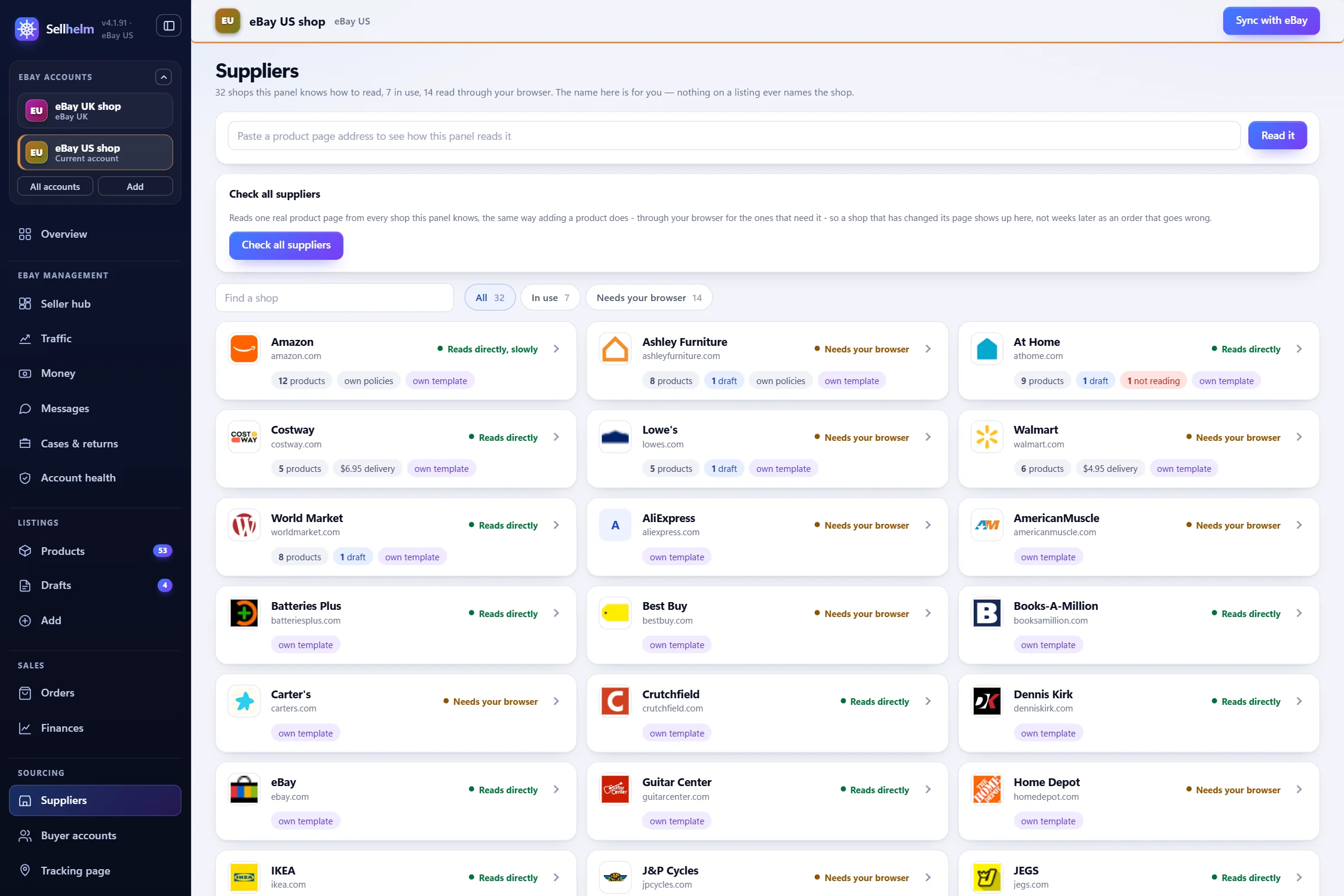
Built-in US suppliers
32 US shops are built in, each added only once it has been proven on real pages. They are read in one of three ways: directly (up to two pages at once with a short pause), gently (one page at a time with a gap of over a second) or through Chrome (the extension opens the public shop page in a background tab in your own browser, reads it and closes it; it never opens your eBay account). The Suppliers page lists them all by category.
Any other shop: paste it and see
If your supplier is not on the list, paste a product page. Before you commit, try it free on the link checker: paste any product page and it tells you whether Sellhelm can read it, shows the draft listing it would build, and shows which of its ways of reading the page worked. Where two readings disagree about a price it says so rather than quietly choosing one.
What Sellhelm refuses to guess
This is what makes automatic checking safe. If a page offers several prices and Sellhelm cannot tell which applies, it refuses the page. Crossed-out and club prices are ignored. A maintenance or error page is refused and retried later. A page it cannot recognize leaves your listing exactly as it was and flags the product. It never tries to get past a captcha or robot check: the product waits for your own browser instead. Out-of-stock wording is checked first, then low stock, then in stock, and when it cannot tell, unknown is never acted on.
Amazon as a source
Sellhelm reads the price you actually pay on an Amazon page (never the crossed-out one), whether the item is Prime and next-day, whether stock is low, and the product gallery. The delivery line you see depends on your own Prime membership and address, because the page is read in your browser. Amazon is read gently, and a robot check is never bypassed. With the optional Tracking & auto orders add-on (Step 11) Sellhelm can also buy from Amazon for you.
AliExpress as a source
AliExpress pages are read only through your own Chrome, because a plain request returns an empty shell and repeated requests meet its slider check, which Sellhelm never solves. It reads the price your browser is shown, the stock for the option the address opens on, the seller’s original photos, and the shipping time and cost (so Product research can filter for fast or free delivery). It does not read the description (you write your own), and a “welcome deal” price that applies to a first order only is not used. Automatic ordering for AliExpress is not built yet: you place AliExpress orders by hand from the order screen.
Your own stock
For hand-made products or stock you hold yourself, use the Your own stock tab on the Add page. You enter the title, brand, your code, barcode, condition, category, how many you have, days to post, your price, what each cost you, your policies, your photographs (at least 500 pixels on the longest side) and the description, and press Save to drafts or List on eBay now. It is built into a listing the same way as any supplier product.
Step 7: find products worth selling
A beginner’s first instinct is to list what looks interesting. The better method is to let the numbers choose: find products your suppliers sell that eBay buyers are already buying, at a price that leaves you a profit after fees. Sellhelm has two tools for this, and a third for checking the sums.
Product research: start with your suppliers
On the Product research page you answer “What do you want to find?” (for example “office chairs” or “garden furniture”), choose where to look (all suppliers or particular shops, including Amazon and AliExpress where you want them), and how many products. Sellhelm searches those shops, then checks every product on eBay for price, how many have sold, and how many people are watching, and works out the profit. You set what counts as worth selling: the profit per sale, the return, how many sold in 90 days, the most sellers you will tolerate, and the supplier price range.
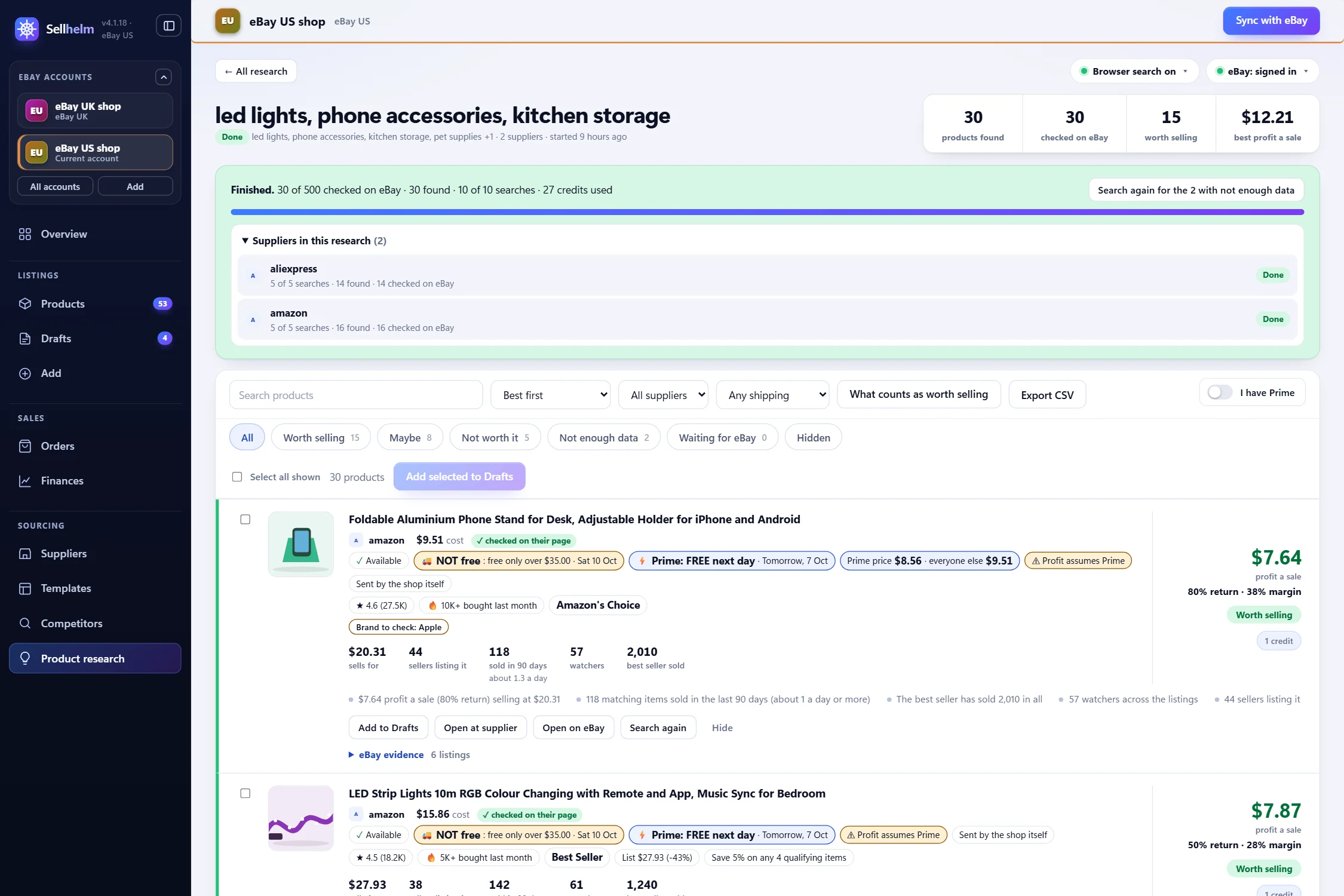
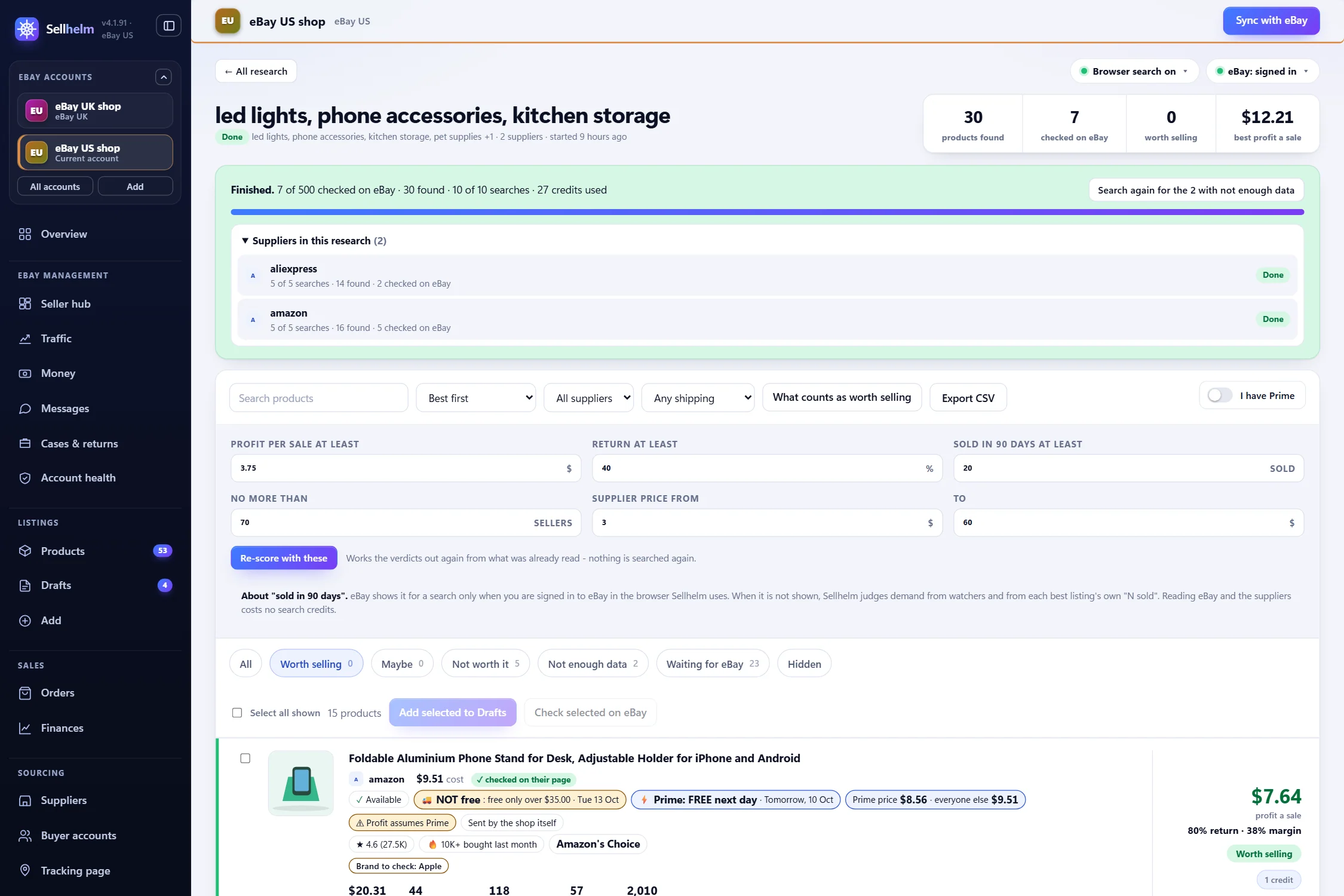
A run keeps going in the background, so you can close the page or restart Sellhelm and it carries on. It pauses, with the reason shown, if it needs an eBay check or a permission from your browser. The money rule is simple: searching your suppliers and checking eBay is free, and a product that fails your price, profit or sold-in-90-days rules is turned away and costs nothing. A product that passes them is checked by an AI that compares the photographs, and that check uses one search credit whatever the AI decides. Credits come with your pack and can be topped up (see what Sellhelm costs). eBay shows the 90-day sold count only when the browser Sellhelm uses is signed in to eBay; otherwise Sellhelm judges demand from watchers and each listing’s own sold figure.
Competitor research: copy what already sells
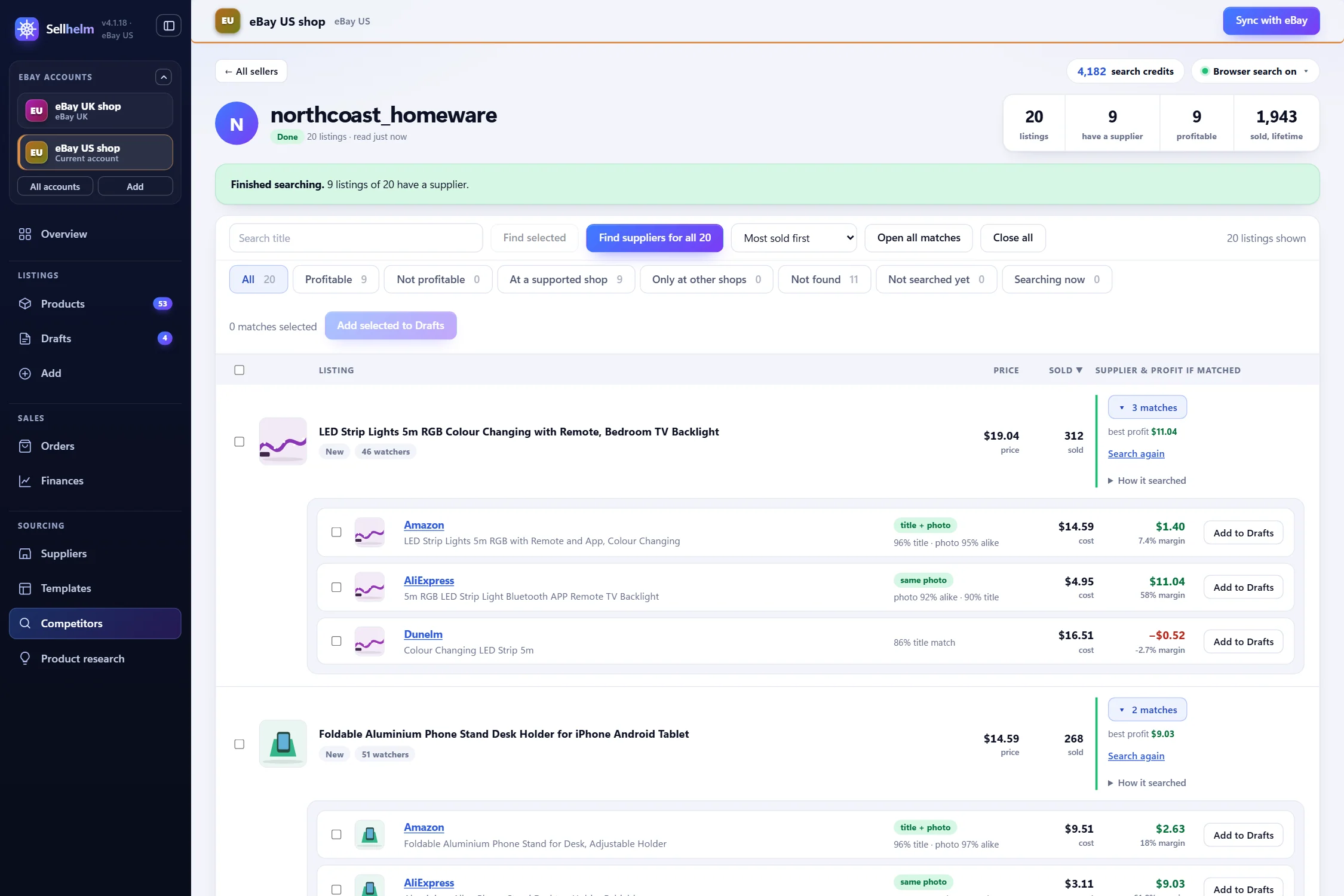
On the Competitor research page, enter an eBay seller’s username and press Whole shop (or Sold items only). Sellhelm reads their listings (up to 1,800), shows what has sold and what people are watching, then finds where each winner comes from. Reading a seller is free; finding a supplier costs one credit only when it finds at least one real match, and nothing when it finds none. A match is shown with its proof (same barcode, same part number, title and photo, price sense-check), and you press Add to Drafts on the ones you want.
Check the sums, and check the brand
Before you add a product, run its cost through the eBay fee calculator. And be careful with branded goods: eBay has over 40,000 rights owners in its VeRO program and publishes no complete list. Sellhelm checks every draft against a built-in watch list of more than ten thousand brands (refreshed daily), plus misspellings and copy-words like “replica” or “inspired by”, and holds anything doubtful for you to look at. It is a watch list, not eBay’s ruling: the last look is always yours.
Part 3 · Your first listing
Step 8: add a product
There are three ways to put a product into Sellhelm, and all of them land in the same place: the Drafts page, where nothing is on eBay yet.
- From the supplier’s page with the Chrome extension. Open the product on the supplier’s site, click the Sellhelm button, and press Send this product to the panel. It reads the page and adds a draft. Nothing is watched and nothing reaches eBay until you list it.
- From the Add page. Paste one or more product addresses, one per line, and press Read and add to drafts (or Preview the first one only to see exactly what would be made). Shops marked “Needs your browser” are fetched through the extension automatically.
- From research. Press Add to Drafts on a product in Product research or Competitor research.
A draft contains the title (the supplier’s brand stripped if you chose that, trimmed to eBay’s 80 characters on a word boundary), the cost, a suggested price, the quantity, the category, up to 24 photos (only those at least 500 pixels are kept), item specifics read from the specification (left blank rather than guessed), and the delivery details. The supplier is never named: Sellhelm refuses to send a listing that names the shop. If you add something already in Sellhelm it says so and tops up the existing draft with fresh photos, cost and stock instead of duplicating it.
Step 9: check the draft and put your first listing on eBay
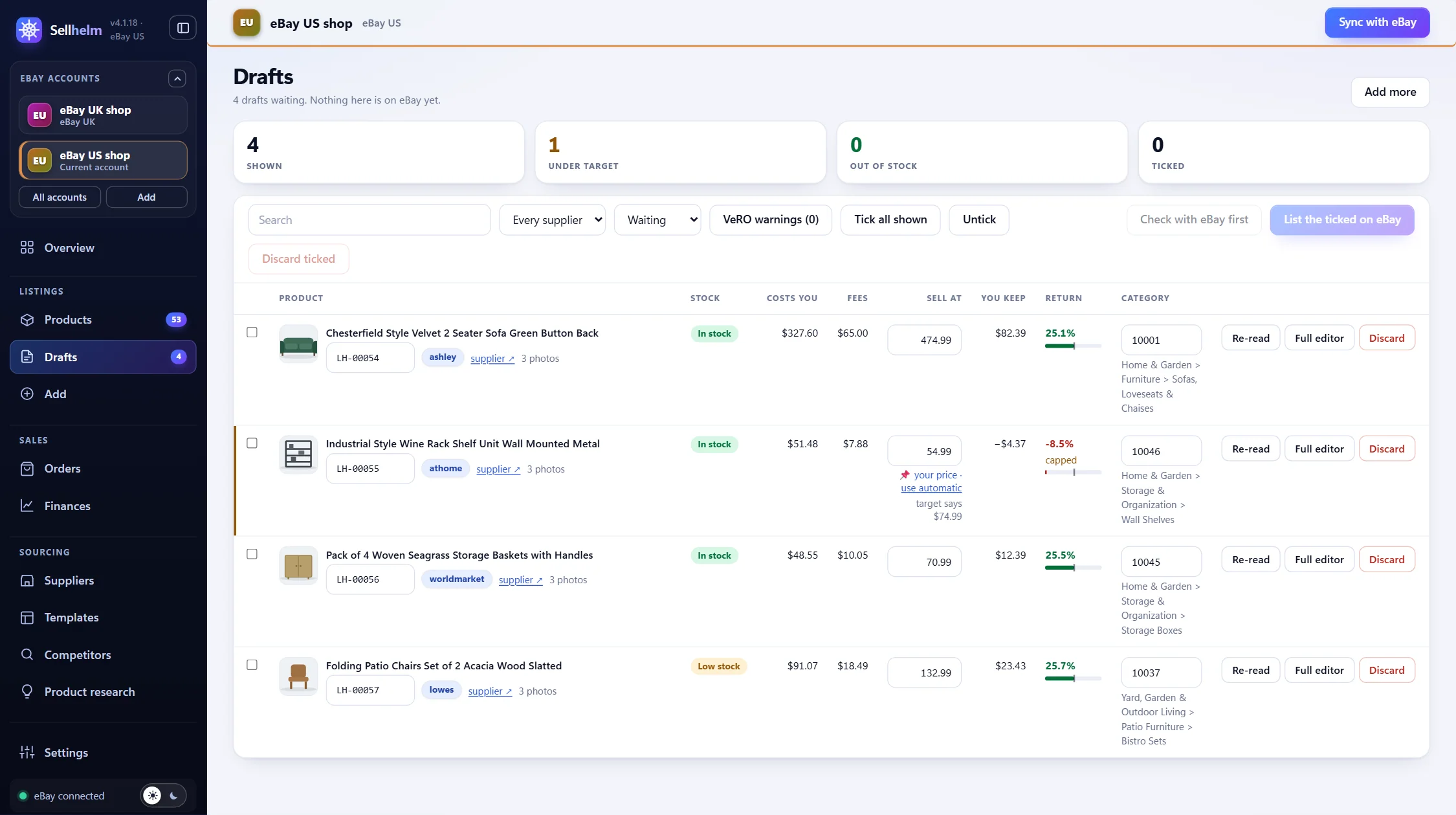
The Drafts page is the quality gate between a supplier’s page and your shop. Each row shows the product, what it costs you, the price to sell at, what you keep and the return, and the category, with chips that say what needs attention: “Out of stock”, “No photos” (eBay will not take a listing without them), “Loses money”, “Under target” and “Ready to check”.
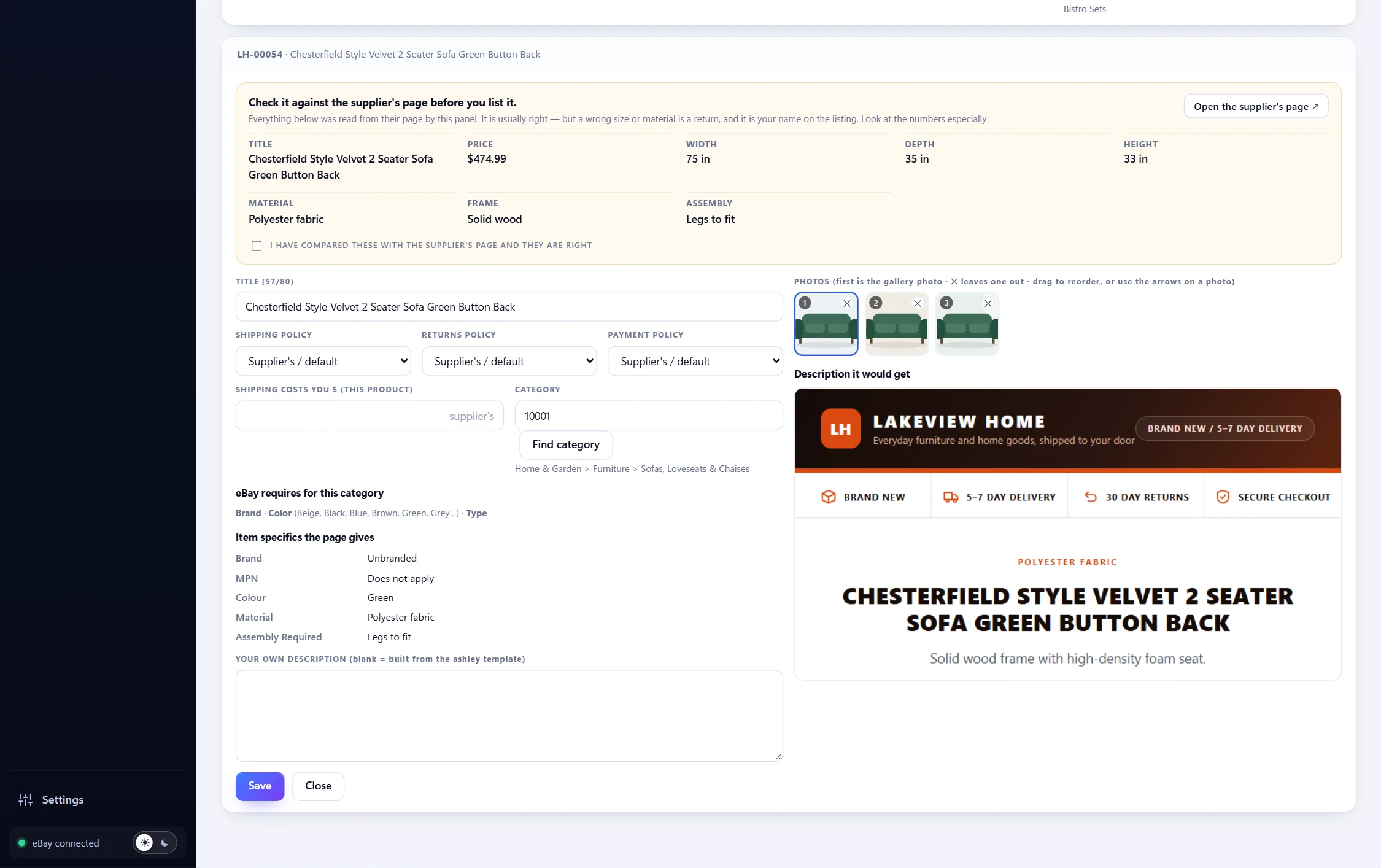
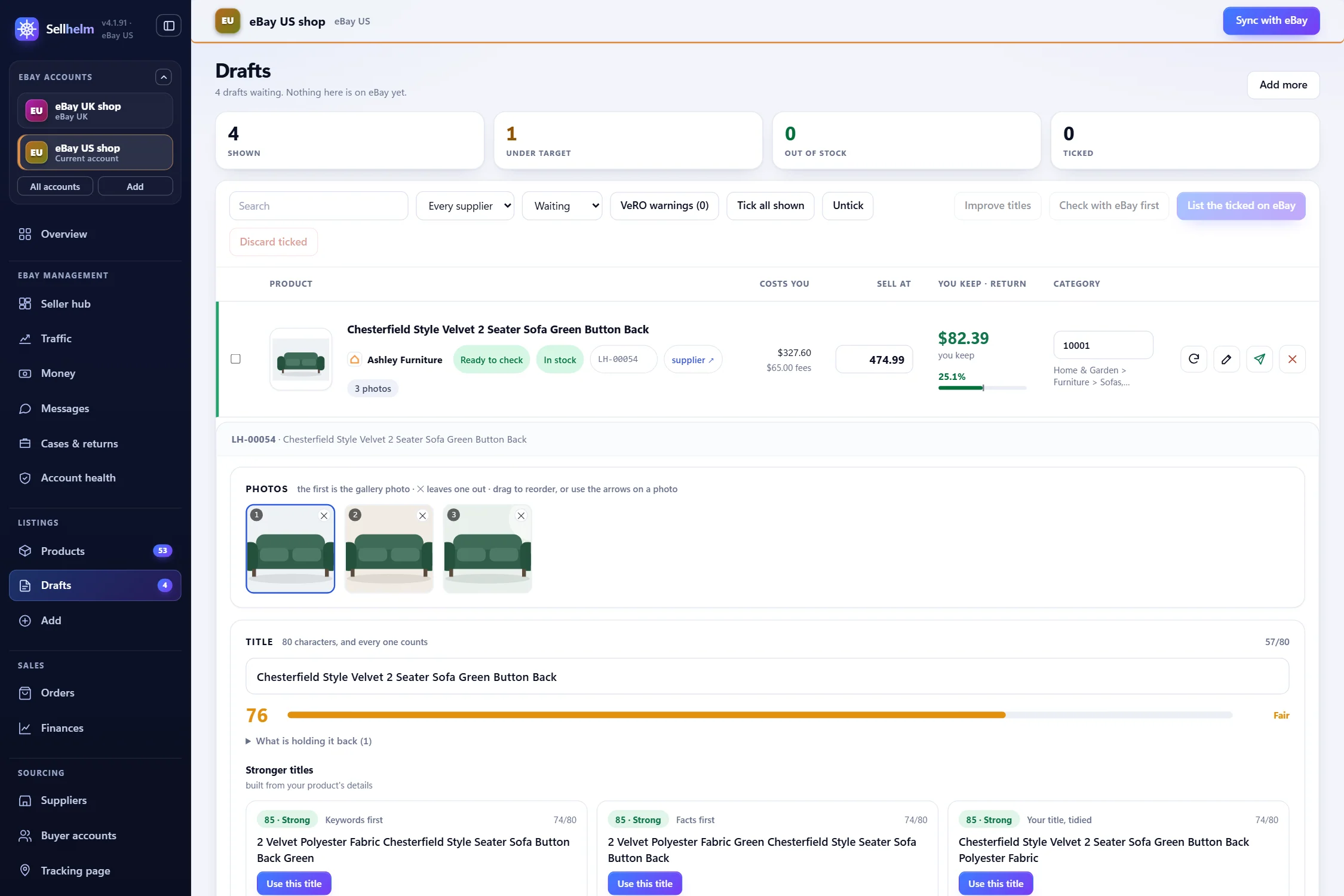
Open a draft to edit it. The editor has your photos (the first is the gallery photo; drag to reorder or remove any), the title with a live score out of 100 and stronger suggestions, the eBay category (with a picker), your policies for this product, the item specifics buyers filter by, your own description if you want one, and a preview of exactly how the listing will look.
Make it look like your shop
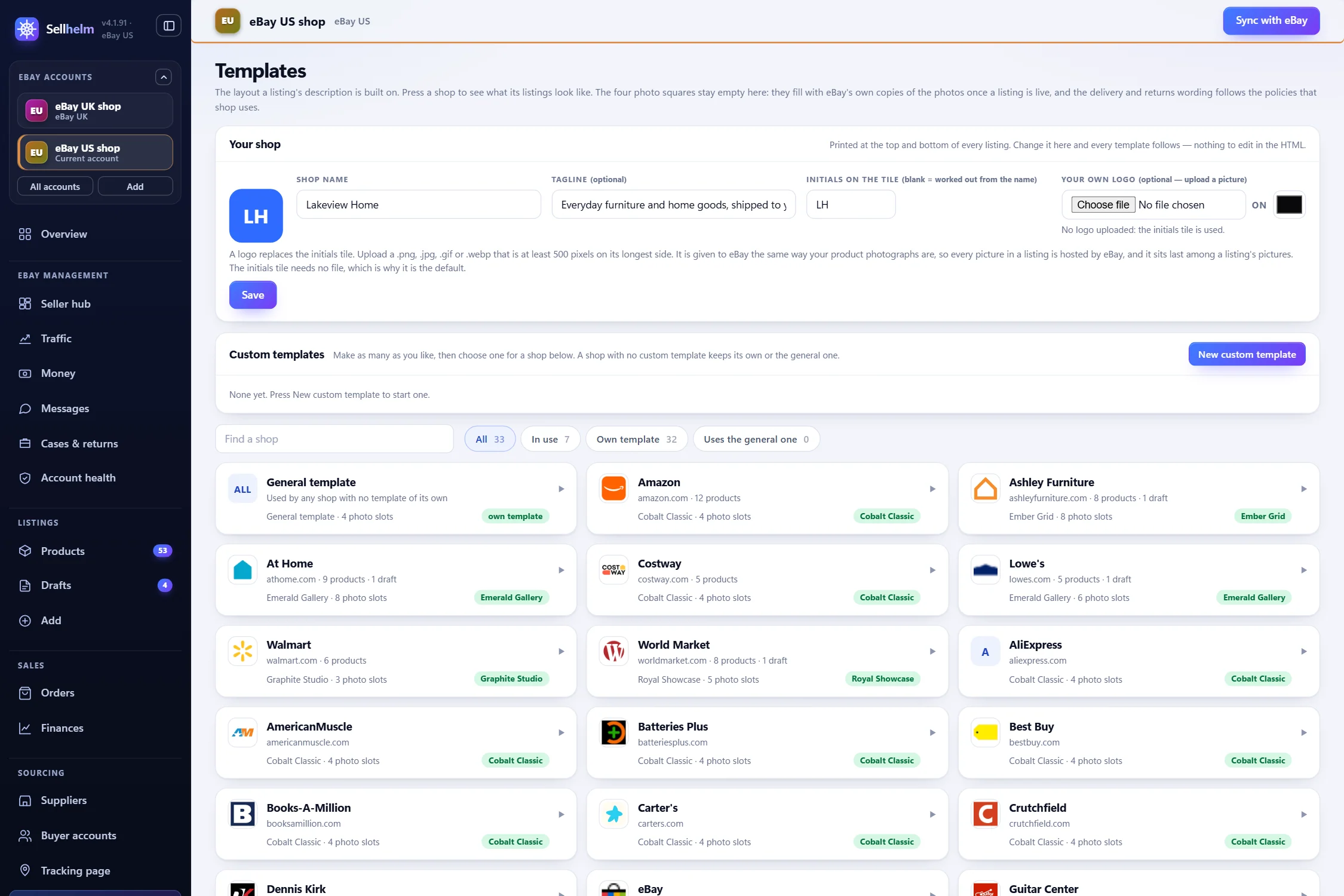
On the Templates page you pick one of five listing designs (or build your own) for the whole shop or for a single supplier, set how many photo slots the design shows, and upload a logo. Listings built from a template are consistent across your whole shop, which buyers read as trustworthy.
- Open the draft and press Open the supplier’s page. Compare the title, price and specification with the supplier’s page and tick “I have compared these with the supplier’s page and they are right.”
- Check the price. If you want a particular price, type it and press “set this price” (a pin appears); “use automatic” gives control back to your target return.
- If the VeRO chip shows, read it. Press “I checked X - fine to sell” only if you have.
- Tick the draft and press Check with eBay first. eBay is asked whether it would accept the listing, and nothing is created.
- Press List the ticked on eBay and confirm. Each becomes a live eBay listing straight through eBay’s interface; you will see “N listings created” or why eBay refused any, and Sellhelm takes you to the Products page.
Start with a handful of products, not hundreds. A small shop that is right beats a large one that is full of mistakes, and your first sales teach you what to look at.
How Sellhelm prices a listing
The price is solved so the money you keep equals your return on spend: spend $100, keep $25, and that is a 25% return. (It is deliberately not a markup, which ignores fees, or a margin, which is measured on the selling price and always looks smaller.) For each product Sellhelm adds the supplier’s price and delivery, finds the price at which eBay’s final value fee for that category, the per-order fee and eBay’s other fees all still leave you your return, adds your “extra on top”, rounds up to your chosen ending, and finally keeps it between your floor and ceiling. A product that cannot reach your target within those limits is flagged “Under target” so you never list it unknowingly.
eBay US collects and pays sales tax itself, so the sums are simply price, fees and cost. Income tax is separate: Sellhelm’s Finances page estimates it so you can put money aside. For the method in full see pricing after eBay’s fees.
Part 4 · Running the shop
Step 10: keep price and stock right, automatically
Suppliers sell out and change prices without telling you. The Products page is where Sellhelm watches for you. Each product has a “Watch” tick; watched products are re-read on a timer, and Sellhelm works out what the listing should say now.
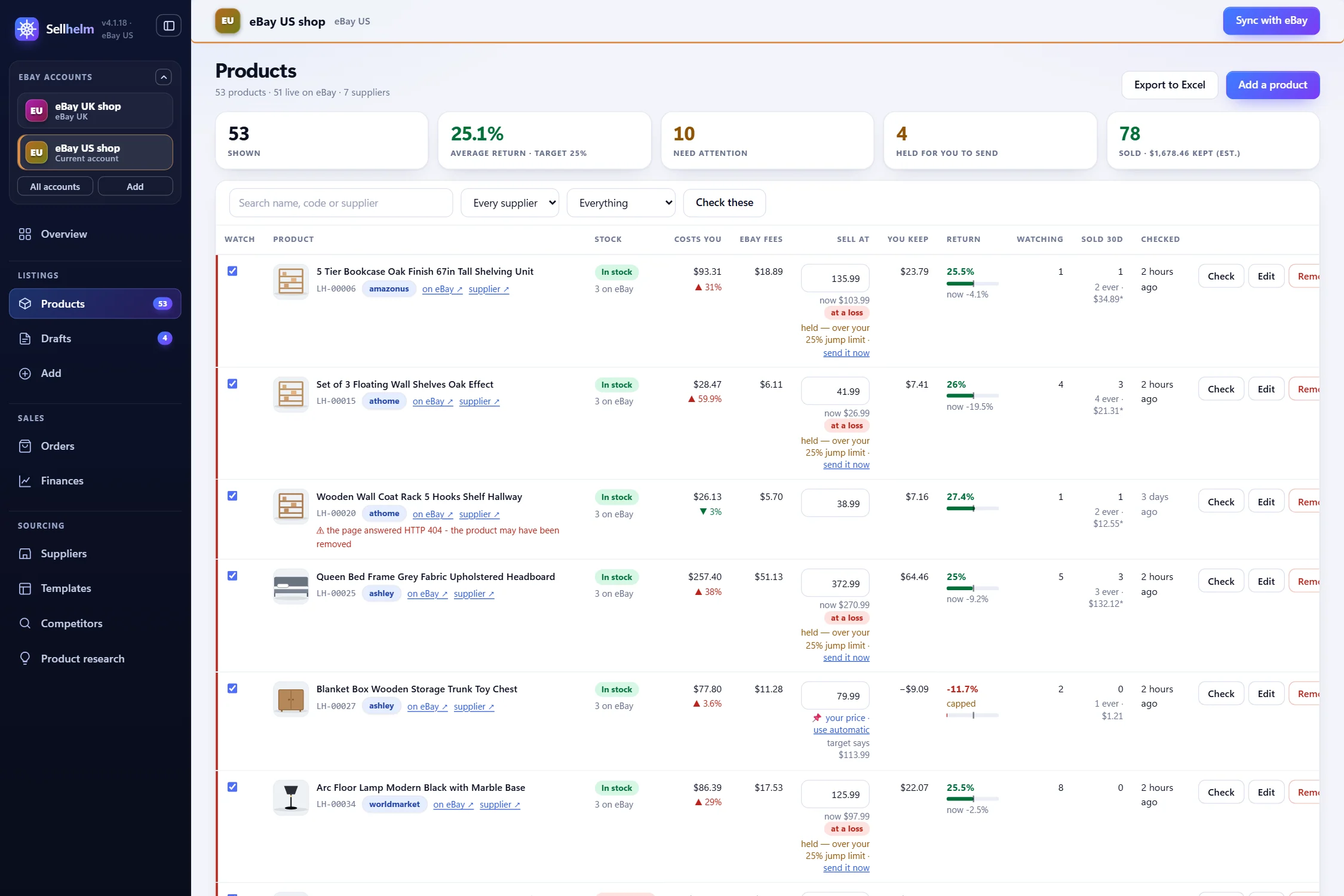
In Settings, Automatic checking you tick “Check my suppliers on a timer” and choose how often (from every 30 minutes to every 24 hours; the default is every four hours) and any quiet hours. A second, separate tick, “and send the changes to eBay”, lets Sellhelm update your live listings itself. A sensible way to start is to check only and look at what it finds for a few days. The timer lives in the panel, so leave Sellhelm running.
The safety limits that make it safe to leave alone
- Hold price jumps over 25%. A bigger move is held on the Products page with “send it now”, so one bad reading cannot reprice your shop.
- Most changes in one run (100). The rest wait for the next run.
- Give up under 80% read rate. If fewer than 80% of the pages could be read, a run sends nothing at all, because something is wrong with the reading, not the prices.
- Flag returns under 8%. A warning, not a block.
- Out of stock sets the quantity to 0, which hides the listing, but only if eBay’s out-of-stock option is on. If it is off Sellhelm holds the change instead, because quantity 0 would end the listing for good, and the Overview tells you.
- Unknown is never acted on. If Sellhelm cannot tell whether something is in stock, it leaves the listing alone.
Shops that refuse programs are queued for your Chrome (up to four pages a cycle), left alone for 15 minutes after refusing, and set aside for a day after five failed tries unless you press Retry.
Step 11: when an order comes in
A sale appears on the Orders page. The stage cards across the top double as filters: To order (paid, place it with the supplier), Waiting for tracking (ordered, add the number when the supplier sends it), On their way, Delivered, Need attention and Canceled / refunded. Each order shows how many days are left before eBay’s ship-by date, so the urgent ones are obvious.
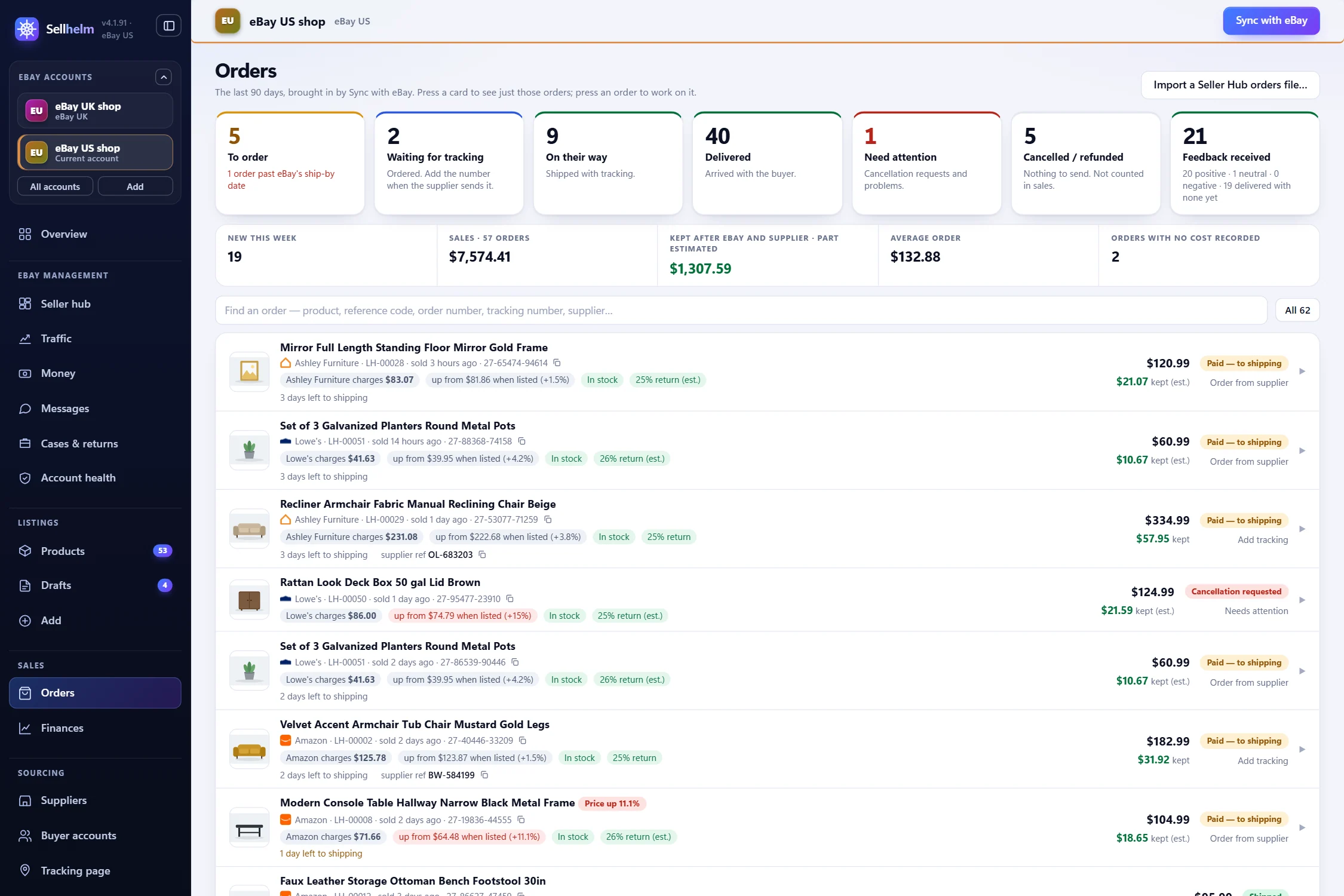
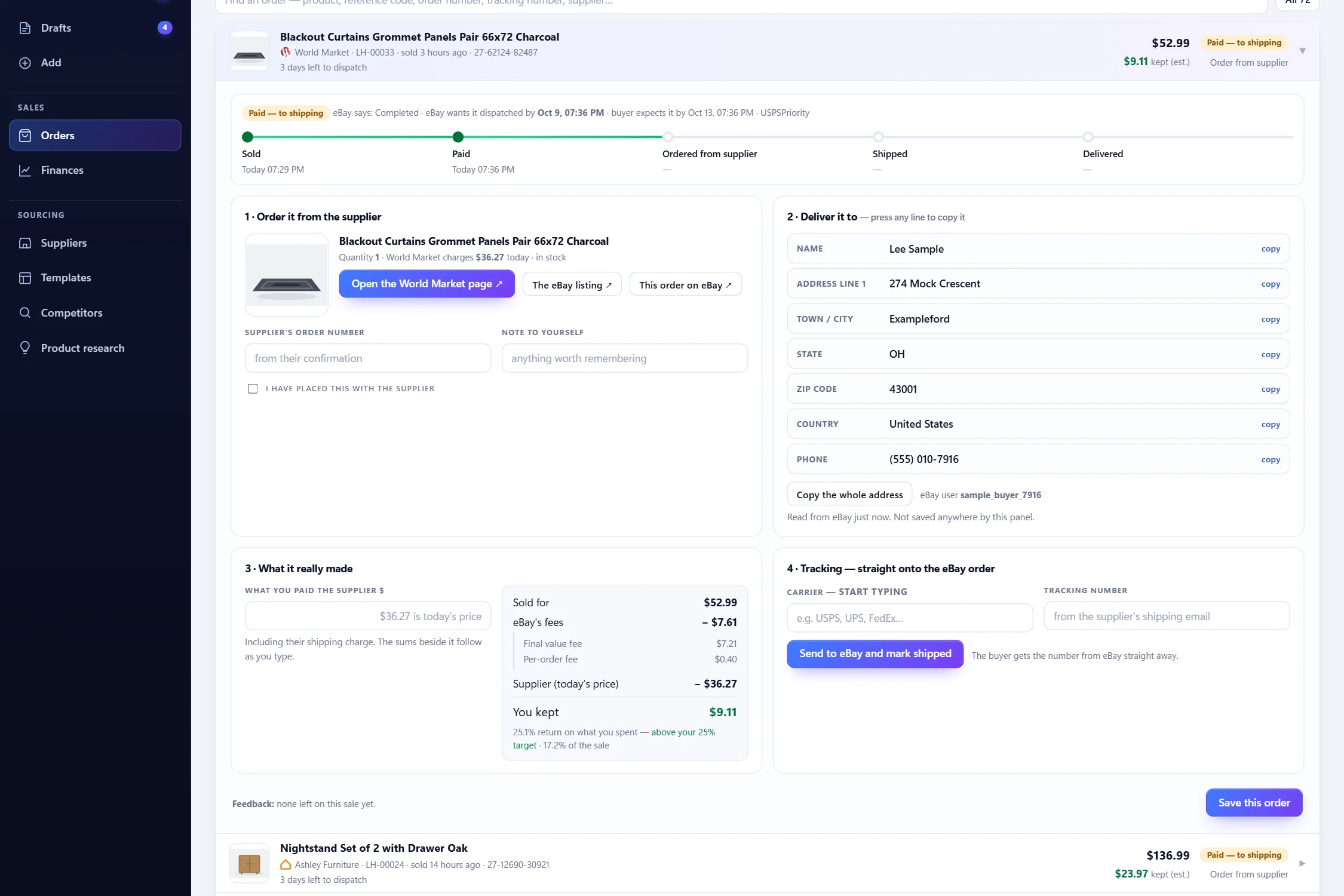
Press an order to open it. It has four boxes, in the order you use them:
- Order it from the supplier. One button opens the supplier’s product page. Place the order there, then enter the supplier’s order number and tick “I have placed this with the supplier”.
- Deliver it to. The buyer’s name and address are read from eBay just now, in copyable parts (name, address lines, city, state, ZIP code, country, phone) plus “Copy the whole address”. The panel never saves them.
- What it really made. Enter what you paid the supplier, including their delivery charge, and the profit updates as you type. This is what makes your Finances accurate.
- Tracking, straight onto the eBay order. Choose the courier, enter the tracking number and press Send to eBay and mark shipped. eBay keeps every number you add. If a parcel genuinely has no number eBay accepts, tick “No tracking available” and the Overview stops asking.
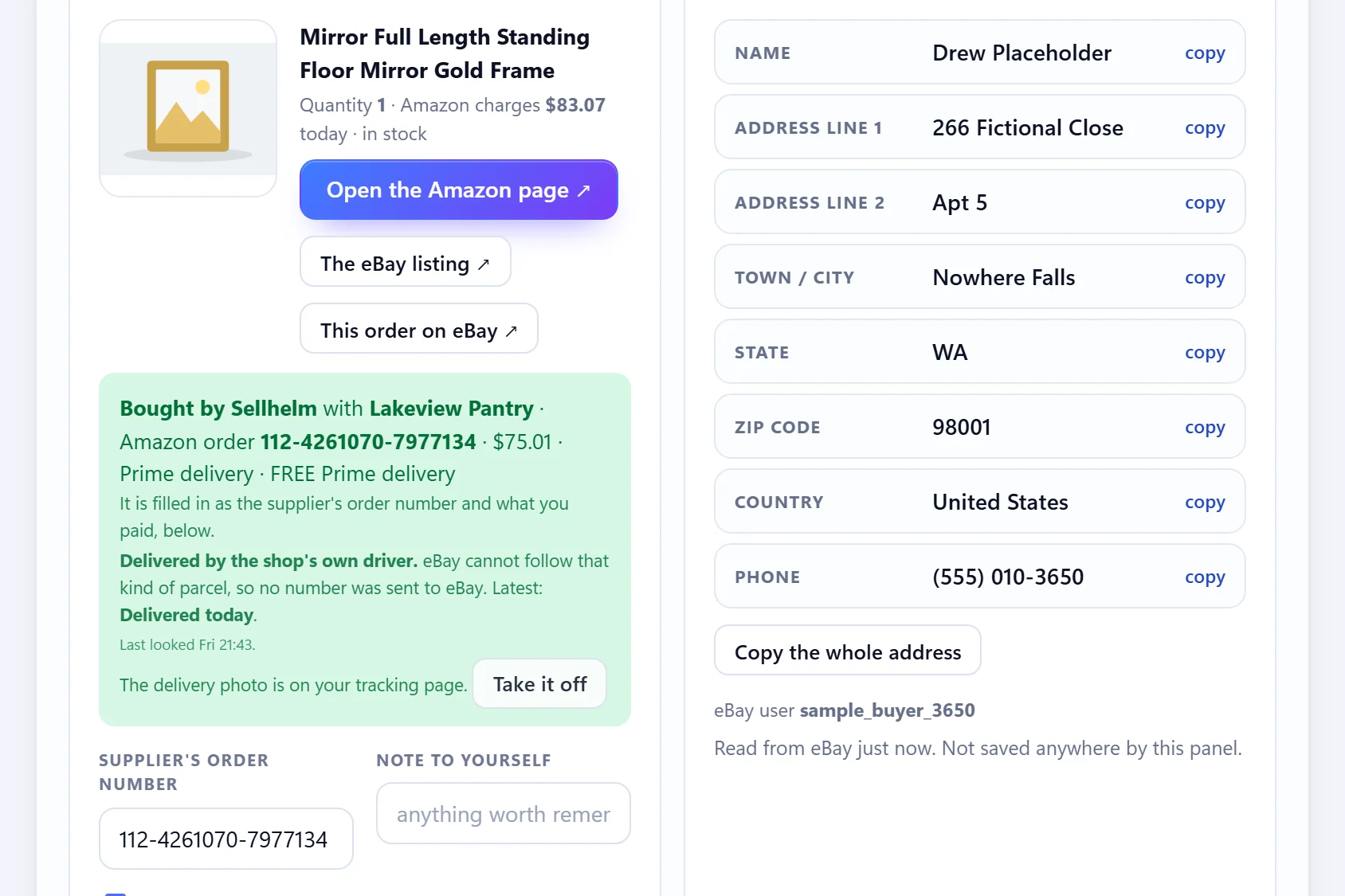
The optional add-on: Tracking & auto orders
Everything above works by hand with no extras. For sellers who want the typing done for them there is one optional add-on, $12.99 a month plus a one-off $12.99 setup (cancel any time; you keep it to the end of the month you paid for). It includes:
- Amazon automatic buying. It fills the basket and the delivery address and, depending on the mode you choose, either stops at pay for you (“Fill it in, then I press pay”, the recommended start) or buys completely (“Buy it completely”, which needs a tick acknowledging that it spends money on your accounts without asking each time). It runs in your own Chrome, which must be open with Sellhelm running. Rules include “Only buy with Prime delivery”, a price tolerance, a limit on orders per account per day and a pause between orders, and a “practice order” that stops at the pay page so you can try it risk-free. The full path was tested on a real Amazon account on 7 and 8 October 2026, and the page tells you exactly what is proven and what is not.
- Parcel tracking. Sellhelm reads each parcel at the shop several times a day, and adds tracking numbers to eBay only when the courier is one eBay recognizees. It never converts or disguises a number.
- Your own tracking page on an address you own, where your customers enter their eBay order number and see a courier-style page that follows every parcel, with the driver’s delivery photo if you allow it.
- AliExpress automatic buying is coming and is not built yet.
A caution that the program itself shows: automatic ordering uses your own accounts at the shops you buy from and may go against a shop’s conditions of use, so an account can be limited or closed. Only use accounts you can afford to lose.
Step 12: run your eBay account without leaving Sellhelm
Sellhelm’s eBay hub and its pages bring the parts of eBay you check every day into the same program:
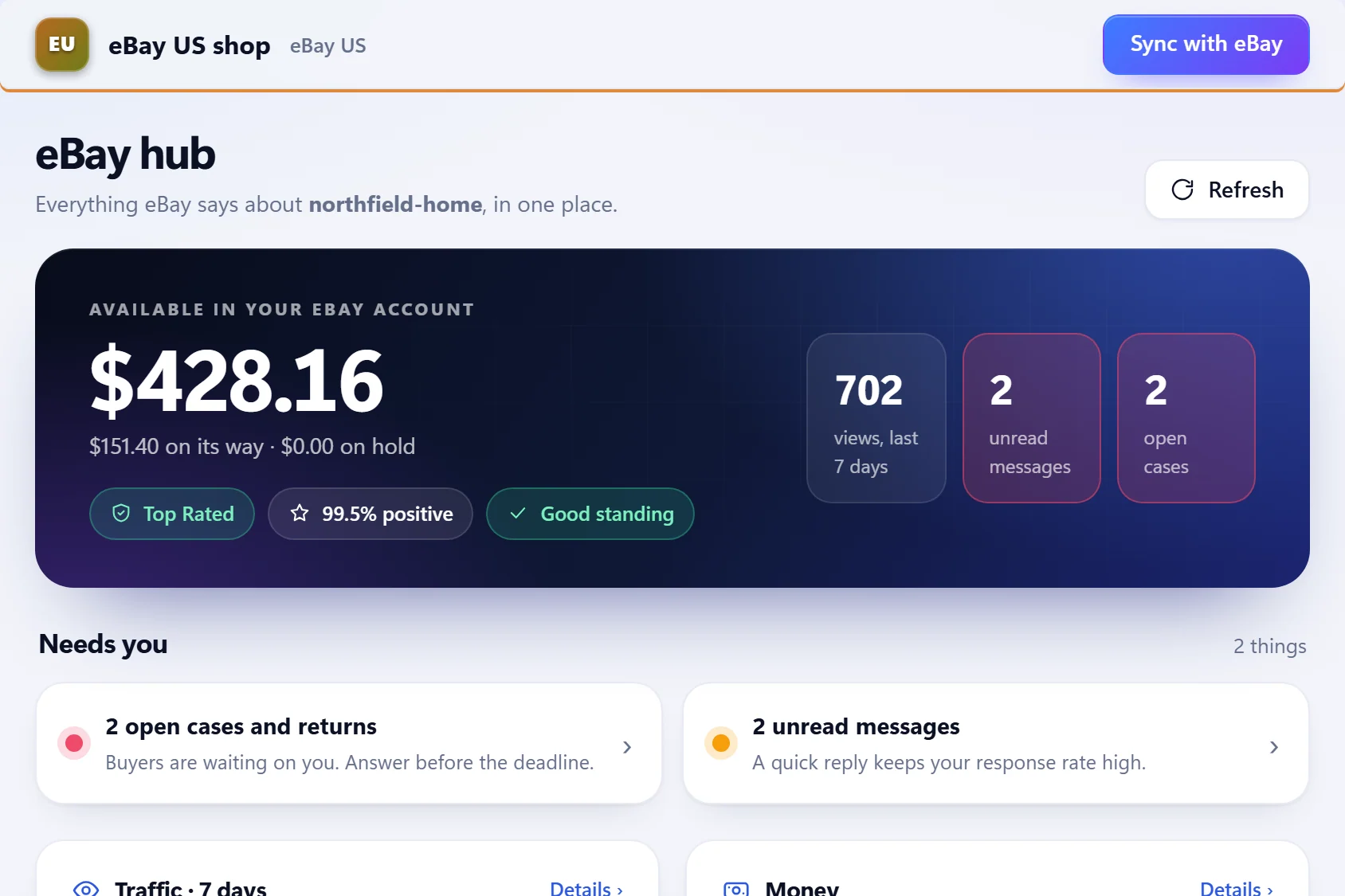
- eBay hub: your available balance (with what is on its way and on hold), seller level, positive feedback, views over seven days, unread messages, open cases, and a “Needs you” list.
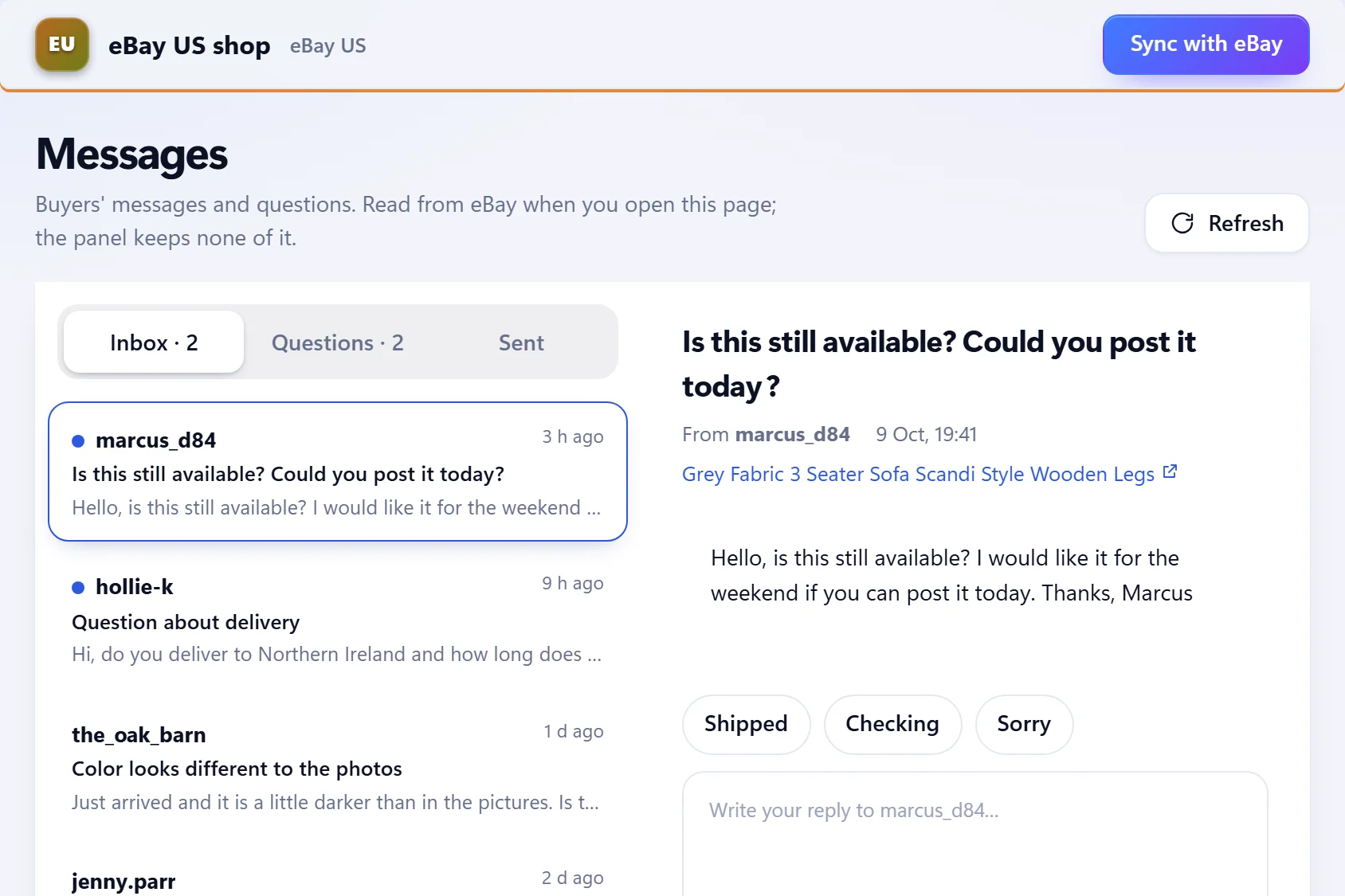
- Messages: read your inbox and sent messages and reply from inside Sellhelm with quick-reply buttons. It sends a real message to the buyer, and Sellhelm keeps nothing.
- Cases & returns: every return, cancellation and case with filters (Open, Returns, Cancellations, Not received). You read it here and answer in eBay’s Resolution Center, which is the one job it does not do for you.
- Account health: your seller level and what it is based on, feedback, and your selling limits and programs.
- Traffic: views, impressions, where views come from, and what is working and not.
- Money: your balance and payouts, sales and fees by month, where the fees go, and every movement.
When something goes wrong with an order
- The supplier is out of stock after you sold it. The order shows “Out of stock at the shop” before you place it. Contact the buyer straight away, offer a replacement or a refund, and cancel through eBay. Sellhelm cannot make a cancellation harmless, which is why it hides listings at zero stock and checks suppliers often.
- The price went up. The order shows “Price up N%”. If the sale now loses money you can still choose to fulfill it, and your Finances will show the true profit because you record what you paid.
- A buyer messages you. Answer from the Messages page. The Orders page’s “Need attention” card and the Overview’s “Needs you” list collect cancellation requests and problems.
- A return or a case is opened. The Cases & returns page lists it with the right filter; you answer it in eBay’s Resolution Center. Keep the supplier’s returns route in mind when you choose suppliers, because the refund comes out of your pocket first.
- A parcel is late. Tell the buyer before they ask. With the add-on, parcel tracking reads the supplier’s parcel several times a day, so you know where it is.
Step 13: know your profit and put tax aside
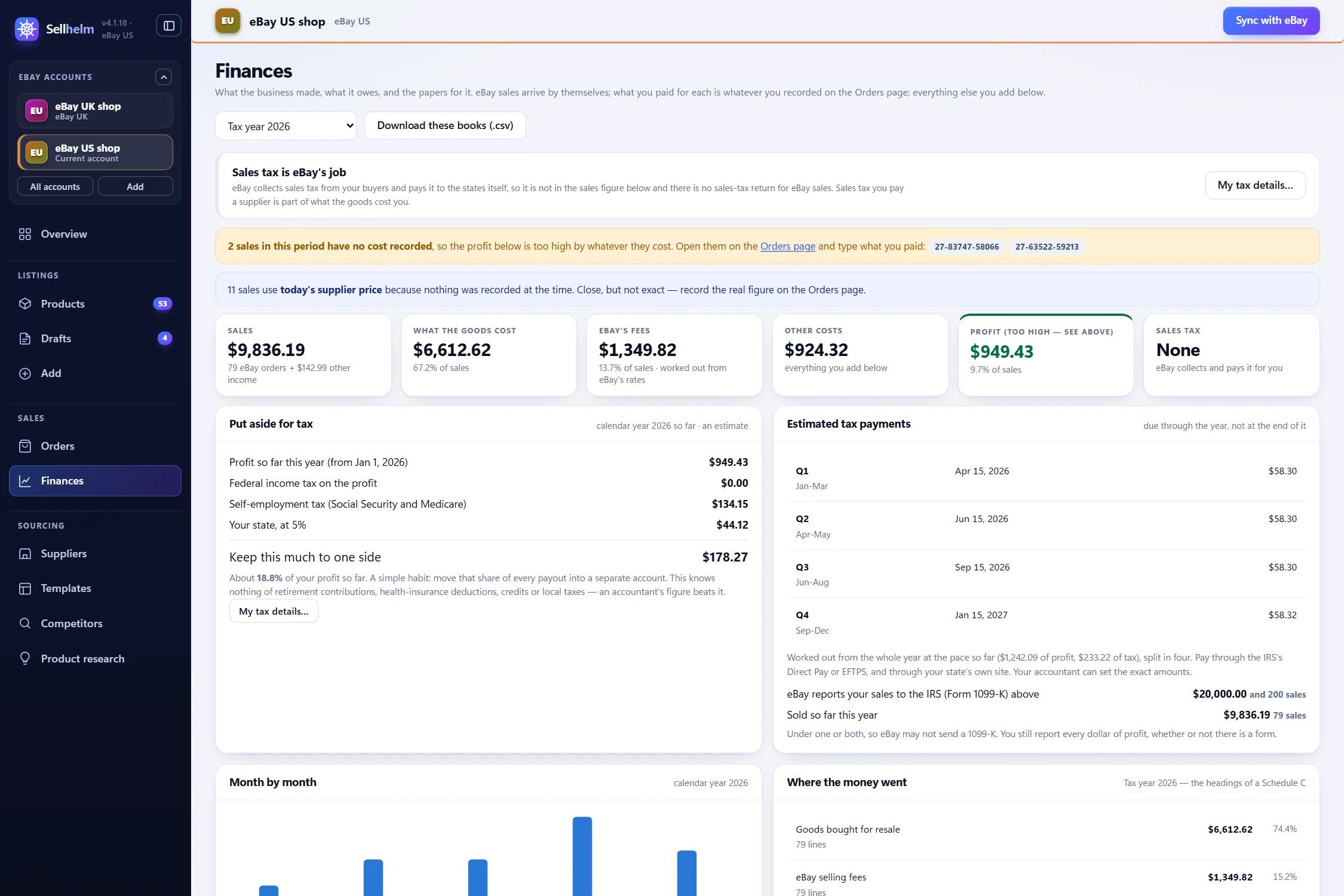
The Finances page turns what you recorded on orders into books: Sales, What the goods cost, eBay’s fees, Other costs, Profit, and your tax estimate. You can add other money in or out (software, packaging, mileage), pick any period, and press Download these books (.csv) for your accountant. A line with no cost recorded is flagged, because profit would otherwise look too high.
- Put aside for tax: an estimate of income tax and self-employment tax for the year, with a button for “My tax details” and quarterly estimated-payment figures, so you do not spend money that is not yours.
- Form 1099-K and Schedule C: Sellhelm tracks the figures eBay reports to the IRS for you, and its “Where the money went” section groups your costs under Schedule C headings, so the tax-return job is mostly done when the time comes.
Part 5 · Making it work
Your first 30 days
| When | What to do | Where |
|---|---|---|
| Day 1 | Open your eBay business account, finish identity and payout checks, create your three business policies, turn on the out-of-stock option, apply for eBay developer keys | eBay |
| Day 1-2 | Install and activate Sellhelm, add the Chrome extension, connect eBay, refresh policies, set your defaults, name your shop | Settings, Templates |
| Days 2-4 | Pick two or three suppliers (try each on the link checker), run Product research on one niche, add 10 to 20 products | Suppliers, Product research, Add |
| Days 4-7 | Review every draft against the supplier’s page, improve titles, run “Check with eBay first”, list your first handful | Drafts |
| Week 2 | Turn on automatic checking (checking only), then once you trust it, sending to eBay; learn the Orders page before your first sale | Settings, Orders |
| Weeks 2-4 | Answer every message promptly, place orders the same day, add tracking before the deadline, record what each order cost | Orders, Messages |
| Week 4 | Read your Finances and Traffic pages, drop what does not sell, add more of what does | Finances, eBay hub |
Mistakes beginners make, and how Sellhelm guards against them
- Overselling. The supplier sells out and you cancel; eBay counts that against your seller performance. Sellhelm watches stock, lists small quantities and sets sold-out items to zero.
- Pricing from a competitor. They may be losing money. Sellhelm prices from your costs and your target return.
- Forgetting to put money aside for tax. Profit is not all yours; Sellhelm shows an estimate to set aside.
- Promising delivery the supplier cannot meet. Choose handling times from what the supplier states, with room to spare.
- Listing branded goods. VeRO takedowns can cost you listings and standing. The VeRO checker holds doubtful drafts.
- Copying another shop’s words and photos. They belong to someone. Write your own description and use photos you have the right to use.
- Letting a bad reading reprice the shop. The jump limit, change cap and read-rate stop exist for exactly this.
- Starting with hundreds of listings. Start with a handful, get the process right, then grow.
- Treating tools as a guarantee. No software guarantees a profit. It makes the sums and the checking reliable; the decisions stay yours.
What Sellhelm costs
Sellhelm is a one-off payment, not a subscription: $99 for Solo (one PC), $159 for Pair (two PCs) and $259 for Crew (five PCs). A license covers one Windows PC and any number of eBay accounts, there are no listing limits and no per-listing fees, every 4.x update is included, and there is a 14-day money-back guarantee. Each pack comes with starter research credits (Solo 5,000, Pair 10,000, Crew 20,000) for Product and Competitor research, and you can top up if you ever use them. The only optional extra is the Tracking & auto orders add-on described in Step 11. The pricing page has the current prices and exactly what is included.
Related guides and tools
- eBay’s dropshipping policy, explained: what is allowed and the grey areas.
- Pricing after eBay’s fees: return on spend and worked examples.
- Keeping stock and prices in sync: why listings drift and how to stop it.
- What to look for in eBay dropshipping software: a buyer’s checklist.
- eBay fee calculator and link checker: both free, no sign-up.
- Every Sellhelm feature, the suppliers, the Chrome extension and the FAQ.
Questions people ask
Is dropshipping on eBay profitable?
It can be, but only if the price covers every cost. eBay’s fees on the whole sale, and delivery take a large share, so thin-margin items often lose money. Work out the return per item first, which is what Sellhelm does for every product. No method or tool guarantees a profit.
How do I start dropshipping on eBay US?
Open an eBay business seller account and finish the identity and payout checks, create your business policies, choose a supplier, work out your costs and fees, then list a few products and fulfill each order on time. This guide takes you through each step in order, with the Sellhelm screens for each.
Do I need a business account to dropship on eBay?
If you list regularly to make a profit, treat yourself as a business: use a business account, keep records and check the IRS rules on business income and self-employment tax. eBay’s rules and the tax rules both look at whether you are trading.
Can I dropship from Amazon or AliExpress to eBay?
Sellhelm can read Amazon and AliExpress pages, and the Amazon route can even place orders for you with the optional add-on. But eBay US’s policy does not allow listing an item and then buying it from another retailer or marketplace that ships it straight to your customer, so using them is your decision and your responsibility. A genuine wholesaler or distributor is the lower-risk route. See eBay’s dropshipping policy explained.
What is the best way to find products to dropship on eBay?
Start from the numbers rather than from what looks interesting: products that your suppliers sell and that eBay buyers already buy, at a price that leaves a profit after fees. Sellhelm’s Product research checks each product on eBay for price, sales and watchers and works out the profit, and Competitor research finds the supplier behind a successful seller’s listings.
Do I need software to dropship on eBay?
No. You can do everything by hand or with spreadsheets. Software earns its keep when you have enough listings that checking prices and stock by hand becomes slow or error-prone. See what to look for in eBay dropshipping software.
How do I get my first eBay dropshipping listing live with Sellhelm?
Add a product from the supplier’s page, open the draft, compare it with the supplier’s page and tick to confirm, improve the title, press Check with eBay first, then List the ticked on eBay. Each becomes a live listing straight through eBay’s interface.
How much money do I need to start?
There is no fixed fee to list beyond eBay’s fees when an item sells, but you will usually pay your supplier before eBay pays out to you, so keep some working cash, and remember refunds come out of your pocket first. Sellhelm itself is a one-off payment with a 14-day money-back guarantee.
What are eBay business policies and do I need them?
They are three reusable sets of rules, for shipping, returns and payment, that listings point to. Create them in eBay’s Seller Hub; Sellhelm then reads them from eBay and lets you choose which to use by default, per supplier or per product.
Can I manage my whole eBay shop from Sellhelm?
Almost. You can find products, list, reprice, take orders, send tracking, reply to buyers, see your balance, traffic, cases and seller level, and keep your books. Answering a case or return is the one job you still do in eBay’s Resolution Center.
Will using software get my eBay account in trouble?
Software is a tool, and how you use it is up to you, so your eBay account is your own responsibility. eBay is rarely a problem for sellers who run things properly: accurate listings, honest delivery times, orders sent on time and tracking added.
How long should my shipping time be?
Base it on the shipping and delivery times your supplier states, plus a margin. A listing that promises less than the supplier can do costs you seller performance, not the supplier.