How it works

From download to your first listing.

A checklist on your Overview ticks itself off as you go. This is the whole path, so nothing about setup is a surprise, including the one step that is eBay's and takes a while.

  1. 1Before you startNothing to buy first
  2. 2Download and installA few minutes
  3. 3Activate your licenceA couple of minutes
  4. 4Connect your eBay accountAbout 15 minutes
  5. 5Add the Chrome extensionA couple of minutes
  6. 6Set the rules that protect youA few minutes
  7. 7Add your first productA few minutes
  8. 8Let it runFrom then on, it looks after itself
1

Before you start

Nothing to buy first

You need four things. Only the first two cost anything, and you probably have them.

  • A Windows 10 or 11 PC. Sellhelm carries its own runtime, so there is nothing else to install first.
  • An eBay UK seller account that you already sell on.
  • Your own free eBay developer keys. eBay issues these to one seller and does not allow sharing, so everyone makes their own. Sellhelm walks you through it.
  • Google Chrome, for the extension. Eight built-in shops are read through it.
  • No other software to install
  • No Sellhelm account inside the program
  • No monthly fee to keep it running
  • No card details on your computer
2

Download and install

A few minutes

Sign in to your account, download the Setup file (named like Sellhelm-Setup-4.0.0.exe) and double-click it. A normal Windows wizard takes you through it: a welcome page, a short page saying what it will do, then Install and Finish. It takes about a minute, and there is nothing to unzip.

It installs into your own user profile, so it never asks for an administrator password and never touches other users on the PC. It adds Sellhelm to your Start menu with its own icon (and a Desktop icon if you tick that), and lists itself under Windows Settings, Apps so you can uninstall it like any other program. Nothing else is left on your Desktop. If an older copy is running it is stopped for you first.

3

Activate your licence

A couple of minutes

Open Sellhelm from the Start menu, or from the last page of Setup. A small Sellhelm icon appears by the clock (right-click it to stop Sellhelm) and your browser opens the panel, which starts on an Activate screen showing this computer's Machine ID.

Copy it, sign in to your account and paste it against a licence. Your licence key appears there straight away (and in an email). Paste it back into the Activate box. That is the whole licence process, and from then on it works offline.

4

Connect your eBay account

About 15 minutes

This is the longest step, and it is eBay's, not ours: every seller creates their own free developer keys. Sellhelm's Settings page has a click-by-click guide open on the page as you go. Here is the shape of it.

On eBay's developer site

  1. Make a developer account. It is separate from your selling account, and free. eBay can take up to a day to approve a brand-new one, so start early.
  2. Create a Production keyset (not Sandbox).
  3. Answer "Marketplace Account Deletion". Choose Exempted and tick "I do not persist eBay data". It is true for Sellhelm, because buyer details are never saved. The keys do not work until this is answered.
  4. Copy your App ID, Dev ID and Cert ID.
  5. Make a RuName, the redirect address eBay signs you back to.

In Sellhelm, Settings

  1. Paste the four values. The boxes are write-only, so a key can never be shown back to anyone.
  2. Open eBay sign-in and sign in with the account you sell on. eBay lands on an odd page: copy its address, paste it in and press Finish. The sign-in lasts about 18 months.
  3. Test the connection, refresh your policies, then press Sync with eBay. Your live listings arrive as products with watching switched off, ready to attach a supplier page to each.
5

Add the Chrome extension

A couple of minutes

Optional, but it lets Sellhelm read the shops that refuse a normal program, and capture a product from any page you are looking at.

  1. In Chrome, open chrome://extensions
  2. Switch on Developer mode
  3. Choose Load unpacked and pick the Sellhelm extension folder (Start menu, Sellhelm, Sellhelm Chrome extension folder opens it)

After each Sellhelm update, reload the extension from the same page. The extension has a Panel port box if you ever change the panel's port.

6

Set the rules that protect you

A few minutes

Sellhelm starts with sensible defaults, listed here. Choose the return you want, decide how big a jump should wait for you, and say whether you are VAT registered. Fee rates are settings too, so they stay right when eBay changes them.

Sellhelm refuses settings that would misprice your shop, such as a floor above a ceiling, and tells you why.

Target returnSpend £100, keep £25
25%
Hold price jumps overBigger changes wait for you
25%
Flag returns underMarks low-return listings
8%
Most changes in one runStock changes go first
100
Give up under read rateNothing sent if fewer pages read
80%
Quantities: in / low / outWhat is sent to eBay
3 / 1 / 0
Prices end inOr .95, .49, .00 or none
.99
Check suppliers everyOff until you turn it on
4 hours
7

Add your first product

A few minutes

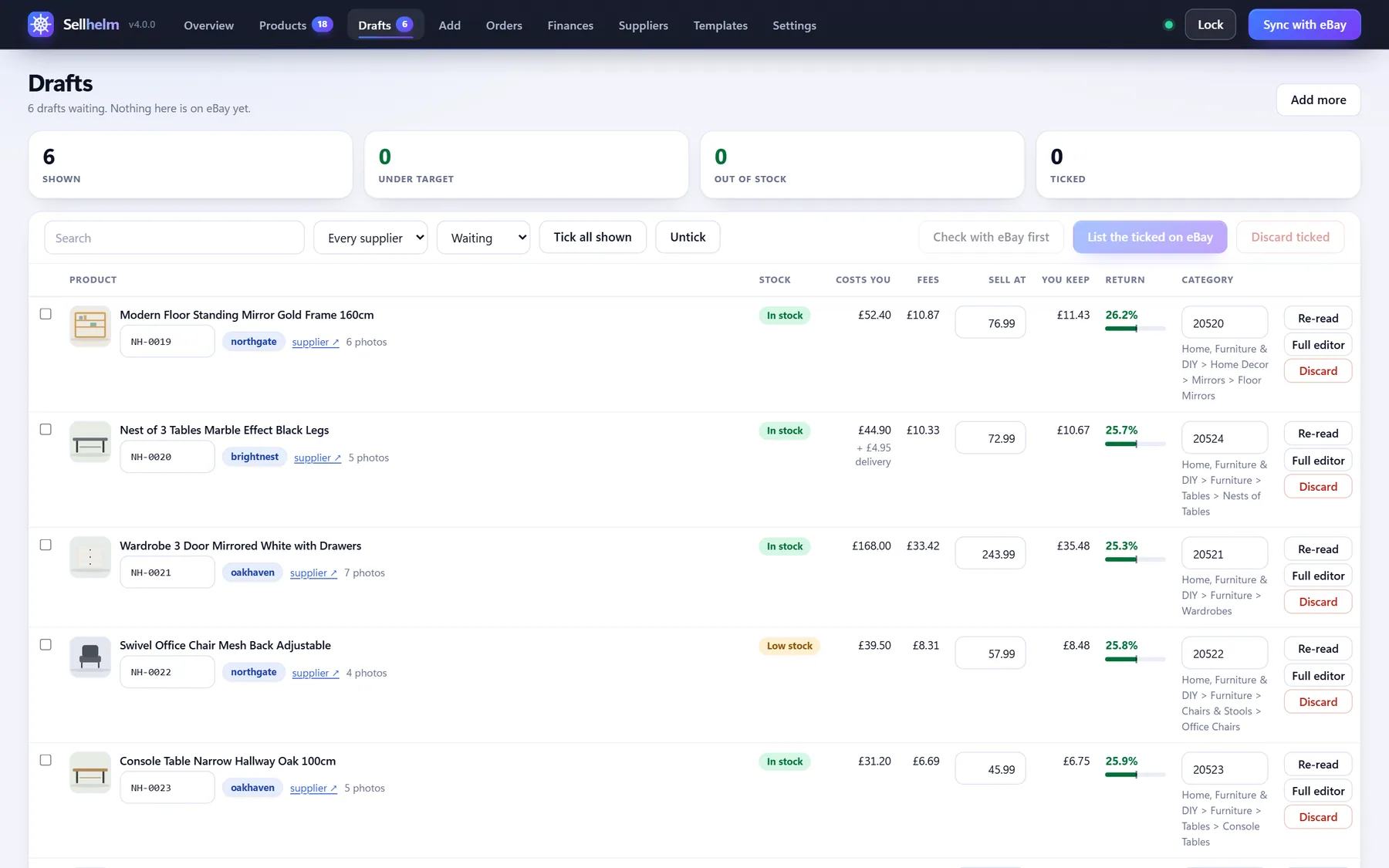
On Add, paste a supplier product link. Sellhelm reads it and makes a draft with the price, stock, photos, specification and a suggested eBay category. Nothing is on eBay yet.

  1. Open the supplier's own page beside the draft
  2. Compare the facts, then tick I have compared these
  3. Press Check with eBay first to ask if eBay would accept it
  4. Press List the ticked on eBay
localhost:4173drafts
The Drafts screen, where a product waits until you have checked it
8

Let it run

From then on, it looks after itself

Turn on automatic checking. A good way to begin is check only, which reads your suppliers and updates the figures without touching eBay, so you can watch what it would do. When you trust it, add send the changes to eBay.

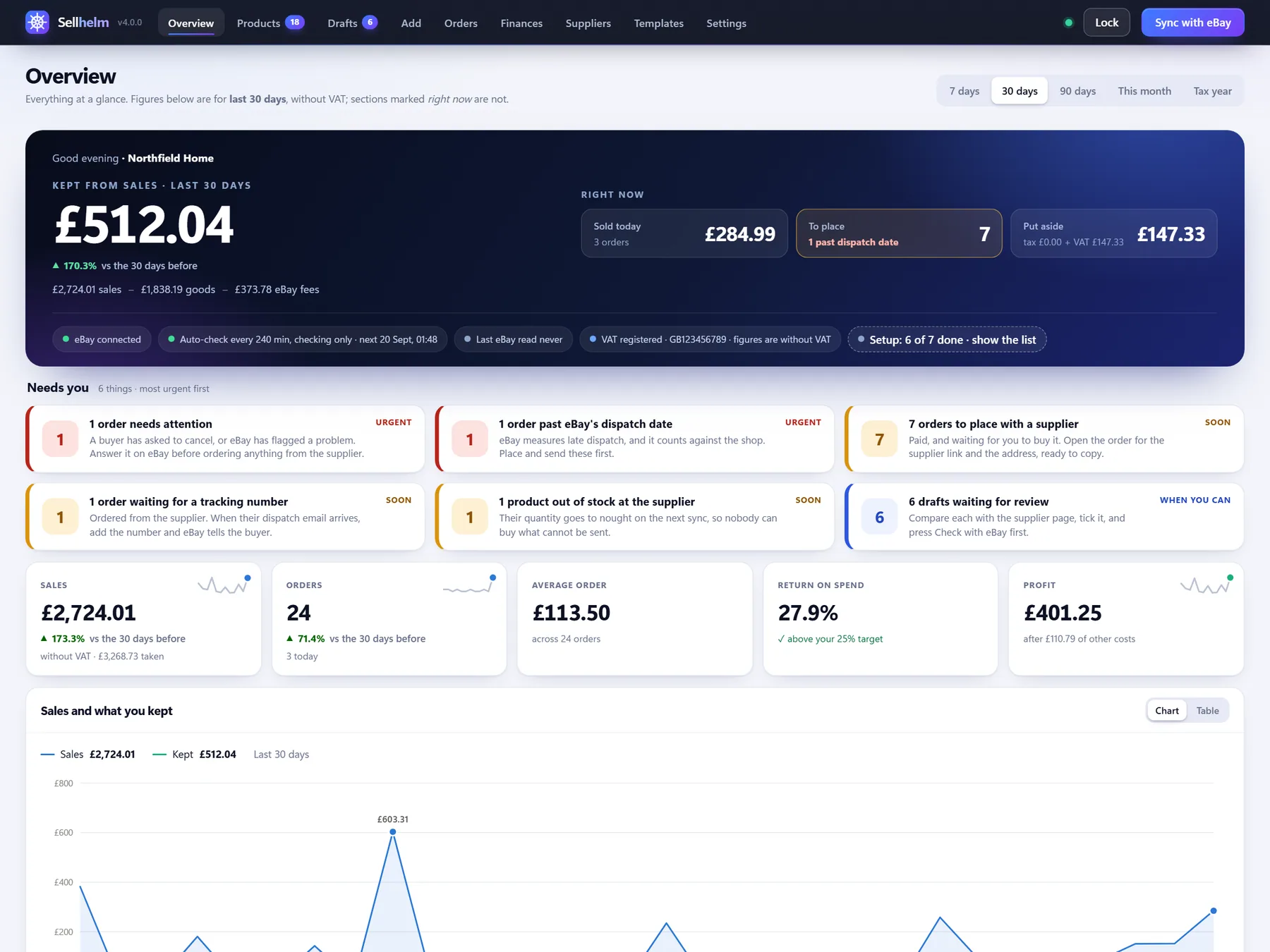
Your Overview shows what needs you, most urgent first. A backup is kept every day, and Export everything gives you one file that restores onto a fresh install. Leave Sellhelm open on your PC: automatic checks run while it is running.

localhost:4173overview
The Overview screen

The panel keeps its own checklist

On your Overview, until you are done

  1. Name your shop
  2. Connect your eBay account
  3. Choose your postage, returns and payment policies
  4. Download eBay's category list
  5. Add the Chrome extension
  6. Add your first product
  7. Turn on automatic checking
!

If something is not right

The usual suspects, and the fix for each

Windows says the publisher could not be verified

Windows shows this for any new program it has not seen much yet, and Sellhelm is not yet code-signed. Choose "More info", then "Run anyway". Your download page shows the file's SHA-256 so you can confirm it is genuine.

Setup says Sellhelm is running, or cannot replace a file

Right-click the small Sellhelm icon by the clock, choose "Stop Sellhelm and close", then run Setup again. Setup also tries to stop it for you first.

My antivirus complains

Sellhelm carries its own copy of Node.js so you install nothing else, and some antivirus tools are wary of that. Add the Sellhelm install folder (%LOCALAPPDATA%\Sellhelm) to the allowed list, or send us the name of the warning.

"Port 4173 is already in use"

Something else on your computer is using it. In the install's app\data folder create a text file called .env (in Notepad: Save as, All files) containing the line PORT=4180, start Sellhelm again, and put the same number in the extension's Panel port box.

The Activate screen says the licence is "for a different computer"

A licence works on one computer. Make sure the Machine ID you sent came from the computer you are activating. A new PC or a Windows reinstall has a new Machine ID: send it from your account and move the licence.

eBay says the app is not authorised

Re-check each of the four values from your developer account (App ID, Dev ID, Cert ID and RuName). A stray space is the usual cause. Each seller needs their own keyset.

The panel says the extension is not found

Reload the extension on chrome://extensions and press F5 on the panel page. If it says the extension is set to a different port, set the same number in the extension's popup.

I forgot my panel password

Stop Sellhelm (right-click its icon by the clock), delete panel-lock.json in the data folder, and start it again. Nothing else is touched.

+

Updating and removing

Both are simple, and neither costs you your data

Updating

  1. Download the new Setup file from your account
  2. Run it. If Sellhelm is running, Setup stops it first
  3. Your data stays where it is, and you do not sign in to eBay again
  4. Reload the extension on chrome://extensions

Removing

  1. Open Windows Settings, Apps, choose Sellhelm and press Uninstall (or use Uninstall Sellhelm in the Start menu)
  2. It asks whether to delete your data too. Choose No to keep it, and reinstalling picks up where you left off
  3. Remove the extension from Chrome

Stuck on any step? Buyers can open a support request from their account and attach Sellhelm's diagnostics report, which contains no keys, orders or buyer details.

Take the helm of your eBay business.

From £99, once. Fourteen days to change your mind.

  • No subscription
  • Every 4.x update included
  • Runs on your own PC